Lectures Python programming for economists
Table of Contents
- Preamble
- Marimo
- Introduction
- Lecture 1: The Power of Compounded Interest and Employment Dynamics
- Lecture 2: Healthcare expenditure
- Learning objectives
- Introduction
- App
- Python Code Explanation
- 1. Reading the data
- 2. Plotting the data
- 3. Defining a linear trend function
- 4. Fitting and visualizing the trend
- 5. Using optimization to find the best fit
- 6. Visualizing the optimal fit
- 7. Extending the model
- 8. Extrapolating the OLS Linear Trend to 2050
- 9. Multi-variable Regression: Adding GDP and OOP
- 10. Using a Numerical Solver (
fsolve) to Find Required OOP Levels - Summary of what the code does
- Summary
- Review Questions
- Lecture 3: Modeling Iteration
- Lecture 4: Search and Matching in the Labor Market
- Lecture 5: Modeling Dynamics
- Lecture 6: Dynamical Systems
- Course takeaway: Python as a tool for economic reasoning
- Bibliography
Preamble
These lectures are (loosely) based on Downey (2023) which is a great introduction into Python. The book can be found here and the associated notebooks here. A main difference is that the lectures here are meant for economics students, not engineers. It is actually a good idea to use the book next to these lectures; they are complementary, not substitutes (“economics speak”). Also, Allen has some great discussions on why models are (actually) useful.
There are two versions of this document:
- the interactive html version which contains the streamlit apps
- and the static pdf version which does not contain interactive apps but show links to these apps
The html version uses the ReadTheOrg theme and the pdf version the Eisvogel latex template.
Marimo
In the lectures we use marimo notebooks. If you follow these lectures as a Tilburg University student, marimo is available at jupyterlab server.
Information on how to install marimo on your own computer can be found here. You can also use molab.
Introduction
The idea of these lectures is to combine Python programing with economics. The overall goal is for you to acquire the skills to transfer information/knowledge to others (say, future colleagues) using more instruments than just written text.
Hence, we teach you how to use Python (learn the syntax) to solve economic models and then to create interactive apps to explain the intuition of these models. To explain how you can use these skills, we present all Python concepts in an economic context and show you how interactive elements can help the reader/user to gain the underlying economic intuition.
We start simple in lecture 1 with compound interest. Later you will learn how to solve for the equilibrium of models and do simulations. At the end you can solve differential equations.
The structure of each lecture is the same:
- explain the economic context
- show the intuition using an interactive notebook/app
- explain the python code that creates the app
- have some review questions
Our advice is to have the website or pdf open to read the information and next to it have your marimo notebook to make notes and program the interactive elements for the app. Most apps below are programmed with streamlit which is very similar to marimo (but easier to use in Emacs in which this document is written).
- Read the economic explanation to understand the intuition of the model.
- Open your own
marimonotebook and type the Python code yourself rather than copying it. - Experiment with the parameters and modify the code to see how the model behaves.
- Use the review questions to check whether you understand both the economic intuition and the Python implementation.
- If you get stuck, try debugging the code yourself first and then consult documentation, classmates, or an LLM.
| Lecture | Topic | Economics | Python |
|---|---|---|---|
| 1 | Compounded interest and employment flows | Simple dynamic processes and stochastic transitions | Variables, loops, simulations, plotting |
| 2 | Healthcare expenditure and regression | Empirical economic analysis using data | pandas, functions, optimization, residual analysis |
| 3 | Iterative equilibrium models | Markets converging through iterative adjustment | Interactive apps, sliders, difference equations |
| 4 | Search and matching model | Structural modeling and calibration | Parameter calibration and simulation |
| 5 | Dynamic economic models | Continuous‑time adjustment and transition paths | Solving differential equations numerically |
| 6 | Dynamical systems | Phase diagrams and stability of equilibria | Simulating two‑dimensional systems |
Lecture 1: The Power of Compounded Interest and Employment Dynamics
Skills you learn in this lecture: simulation of simple economic processes, Python basics (variables, lists, loops), visualization of dynamic outcomes.
Learning objectives
After completing this lecture you should be able to:
- explain the economic intuition behind compounded interest and unemployment dynamics
- understand how stochastic processes can generate aggregate economic outcomes
- translate simple economic mechanisms into Python simulations
- work with variables, lists, and
forloops to simulate dynamics over time - visualize simulation results using
matplotliband analyze how outcomes change when parameters vary
Introduction
In this lecture we program two simple economic models. First, we model compounded interest to understand how savings evolve over time when interest accumulates. Second, we simulate employment dynamics in a small labor market where workers may lose or find jobs with certain probabilities.
These examples illustrate how Python can be used to represent economic mechanisms step by step. Even simple models already allow us to visualize dynamics, run simulations, and explore how outcomes depend on parameter values.
Apps
This lecture introduces Python through two economic models:
- The Power of Compounded Interest: We model the growth of a bank account with regular deposits and compounded interest. This is analogous to the “falling coin” example in physics, but here we use an economic scenario.
- Modeling Employment and Unemployment: We model the employment status of 20 people in a village. Each person can be either employed or unemployed. At each time step, an employed person can lose their job (become unemployed) with a certain probability, and an unemployed person can find a job (become employed) with another probability.
You can experiment with both models in the interactive apps below.
Compounded interest
Most people know that a savings account with a given sum of money in it can grow a lot through yearly interest payments. Hence a low starting capital with high interest rate can outperform a high starting capital with low interest rate. Suppose you want to explain to colleagues or friends that having a high monthly deposit with a low interest rate can similarly be “dwarfed” by an alternative with low monthly deposit but high interest rate. How can you do this using an interactive app?
The following app illustrates how a lower monthly deposit can be “compensated” by a higher interest rate and lead to a higher final balance then a high monthly deposit with lower interest rate. Adjust the sliders by setting a relatively high deposit and low interest rate in scenario 1 and low deposit with high interest rate in scenario 2. Click the ’Calculate’ button to see how the balance develops over time in each scenario.
If the app does not load, open it in a new tab .
Employment dynamics
Some people tend to think of unemployment as a static phenomenon. Many people work and others are unemployed all their life. To explain that unemployment is a dynamic and stochastic phenomenon, we create an interactive app starting from intuitive basic principles: workers have a probability of losing their job (e.g. their firm goes bankrupt) and unemployed have a probability of finding a job. Although at the macro level there are –more of less– stable levels of employment and unemployment, at the micro level there is a lot of change. We can follow workers over time, show how many are either employed or unemployed in each time period and thus illustrate that there is a lot of variation. Further, even when we know what the unemployment rate will be in the long run, there will be a lot of variation around this steady state unemployment rate. Not a static phenomenon at all!
The following app illustrates how employment/unemployment evolves in a small town with 20 inhabitants. We start with full employment. With the sliders you can set the probability that an employee is fired and the probability that an unemployed person is hired. Select the number of periods for which you want to run the simulation and click the ’Run Simulation’ button.
The second part of the app illustrates a parameter sweep. This shows how sensitive an outcome is to the parameter value. In this case, we want to analyze the sensitivity of the steady state unemployment level to the probability of finding a job. As this is a simple simulation model, we can actually derive the long run unemployment level analytically. The figure compares the simulated long run unemployment level with the analytic solution. For the probability of being fired chosen in the first app, clicking ’Sweep Parameter’ shows long run unemployment for different values of \(p_{hired}\).
If the app does not load, open it in a new tab .
Python Code Explanation
In this section we explain the Python code for the model itself, not yet for the interactive elements. In a next lecture we explain how to create sliders for parameters.
Compounded Interest Model
Let’s see how you can model the growth of a bank account with regular deposits and compounded interest in Python.
If you want to learn to program in Python, our advice is that you type the code below in your marimo notebook and run it. That is, type the code; not copy/paste. The frustrating process of typos and errors is all part of the deal when learning to program.
Then start to “play with” code: change things, experiment with the code. You cannot break anything and getting errors, seeing unexpected results and then using google or an LLM to understand the errors and change the code: this is how you learn to program. Just glancing over the code below and thinking you “understand things” is a waste of your time.
1. Set the parameters
We start by defining the monthly deposit, the monthly interest rate, and the number of months. Here, we use euros as the currency.
We do this by defining variables, like deposit, and give these a value:
deposit = 500      # euros per month
rate = 0.003        # monthly interest rate (0.3%)
months = 20 * 12    # 20 years
2. Initialize the balance and create an empty list
We start with a balance of zero. We also create an empty list called balances to store the account balance at the end of each month.
In Python, a list is a data structure that can hold an ordered collection of items. In Python a list is denoted by brackets []. “Ordered” in the sense that the first element refers to the start balance, the second element to the balance one month after that etc. Later we will encounter the data structure dictionary which is unordered.
We use a list here so we can keep track of the balance after each month, which is useful for plotting the results later.
balance = 0
balances = []
3. Simulate the account growth with a for loop
We use a for loop to repeat the same calculation for each month.
In each iteration, we first store the current balance in the list, then update the balance by adding the deposit and applying the interest.
for m in range(months + 1):This loop runs once for each month, including month 0. Note the “:” (colon) at the end of this statement.balances.append(balance)This adds the current balance to the end of thebalanceslist. Note that the two statements that need to be repeated in the for loop have the same alignment (usually 4 spaces from the left in Python; your editor probably does this for you). This tells Python the lines that belong to the for-loop (without parentheses, or semicolons in the code). The next statement not belonging to the loop is outlined on the left again. If you have a so-called nested for-loop, you go 8 spaces to the right (as we will see below).
for m in range(months + 1):
    balances.append(balance)
    balance = balance * (1 + rate) + deposit
Note we use the for loop here for pedagogical reasons. In Python for loops are discouraged; it is better (faster and more readable) to use vector operations in numpy.
4. Plot the results
We use matplotlib to visualize the growth of the account over time.
- for the code cell below we need to import two libraries
matplotlib,numpythat we use in the code. Statements likeimport numpy as npmean that we can accessnumpyfunctions likearangeby writingnp.arange - the
np.arangefunction takes three arguments: begin point, end point and step size; the end point is not included. In yourmarimonotebook: try different arguments in this function and see what the outcome is. years = np.arange(months + 1) / 12This creates a list of time points in years, matching the number of balances.plt.plot(years, balances)Theplotfunction takes two lists or arrays of equal length: the first for the x-axis, years, and the second for the y-axis, balances in euros.- By looking at the figure, you can probably infer what the functions
plt.xlabel, plt.ylabel, plt.titledo.
import matplotlib.pyplot as plt
import numpy as np

years = np.arange(months + 1) / 12
plt.plot(years, balances)
plt.xlabel("Years")
plt.ylabel("Account Balance (€)")
plt.title("Compounded Interest Over Time")
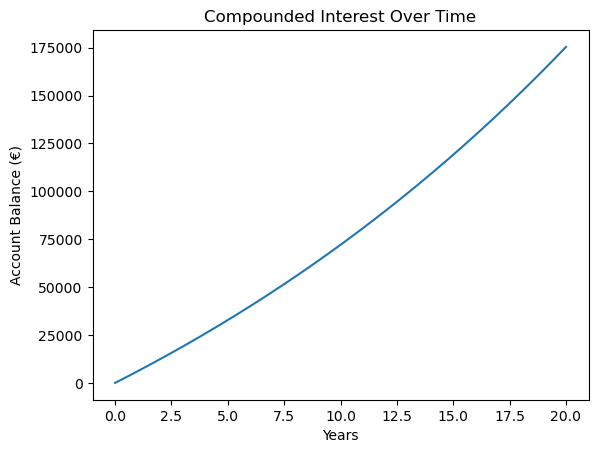
Figure 1: Our first Python figure!
Use an LLM to figure out what the following Python code does:
periods = months + 1
factors = np.power(1 + rate, np.arange(periods))
balances = deposit * np.cumsum(factors)
This is how you can avoid for loops, but do not worry if you do not understand this at once.
Employment Dynamics Model
Let’s break down the Python code for simulating employment and unemployment in a small village.
1. Set the parameters
We define the number of people, the probabilities, and the number of time steps. Type this into your marimo notebook and see what happens if you change the value of the variable n_people to, say, 1000. Interpret the different results you see compared to our case with 20 people.
n_people = 20
p_fired = 0.05   # probability an employed person is fired each step
p_hired = 0.10   # probability an unemployed person finds a job each step
n_steps = 100
2. Initialize the state
We start with everyone employed. We create lists to store the number of employed, unemployed and fired people at each time step.
employed = n_people
unemployed = 0
employed_hist = [employed]
unemployed_hist = [unemployed]
fired_hist = []
3. Simulate the process with a for loop
For each time step:
- For each employed person, we draw from a Bernoulli distribution to see whether they are fired. A Bernoulli distribution is equivalent to a binomial distribution with \(n=1\).
- For each unemployed person, we draw from a Bernoulli distribution to see whether they are hired.
- We update the counts and store them in the lists.
We use np.random.binomial(n, p) to draw the number of successes, fired or hired, out of n people, each with probability p.
employed = employed - fired + hired means that the new value of employed (left hand side) equals the previous value of this variable minus the people that are fired plus the hires this period.
Above we have already seen the use of append to “add” a value to a list or an array.
for t in range(n_steps):
    fired = np.random.binomial(employed, p_fired)
    hired = np.random.binomial(unemployed, p_hired)
    employed = employed - fired + hired
    unemployed = n_people - employed
    employed_hist.append(employed)
    unemployed_hist.append(unemployed)
    fired_hist.append(fired)
You may be tempted to write hired = p_hired * unemployed and fired = p_fired * employed. Is this the same as the code above? If not, what is the difference?
4. Plot the results
We use matplotlib to plot the number of employed and unemployed people over time and the number of people that are fired in each period. People fired is a flow variable: the people “flowing” from the stock of employed people to the stock of unemployed people. People hired is a flow from unemployment to employment but we are not plotting this to avoid crowding the figure.
When you add a label to a plt.plot or plt.scatter command with label="Employed", you need to specify plt.legend() to add the legend to the figure. With the latter function you can also determine where the legend will be added in the figure. Google or use an LLM to find out how that works. If you do not specify a position, matplotlib will try to find the best placement itself. Usually this works fine, but you can correct matplotlib if you want.
As people fired is a flow variable, we have one observation less in fired_hist than in employed_hist or in steps. Hence we use indexing steps[1:] to select the second value in steps. Index 1 refers to the second value as Python starts counting from 0. Hence steps[0] refers to the first element in array steps. Further the colon “:” in steps[1:] refers to the second element and all elements following it.
We will come back to indexing and slicing later on, but you can already experiment with steps[0:],steps[:7], steps[-1] etc.
import matplotlib.pyplot as plt
steps = np.arange(n_steps + 1)
plt.plot(steps, employed_hist, label="Employed")
plt.plot(steps, unemployed_hist, label="Unemployed")
plt.plot(steps[1:], fired_hist, '--', label="People fired")
plt.xlabel("Time step")
plt.ylabel("Number of people")
plt.title("Employment and Unemployment Over Time")
plt.legend()
plt.grid(True)
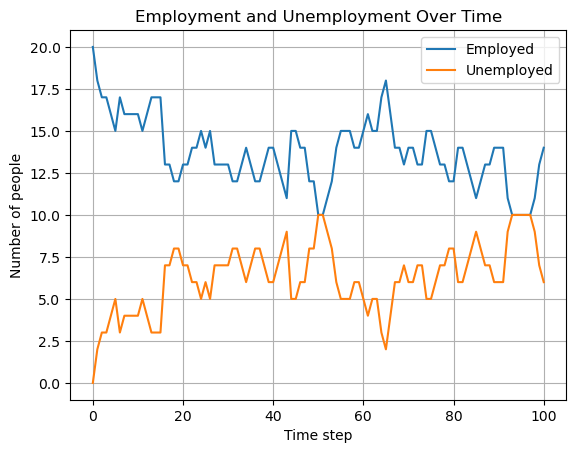
Figure 2: Variation in the number of people employed, unemployed and fired over time
Summary of what the code does
- Step 1: Set the parameters for the simulation.
- Step 2: Initialize the state and lists to store the results.
- Step 3: Use a for loop to simulate each time step, updating the state using random draws from the binomial distribution.
- Step 4: Plot the results to visualize how employment and unemployment evolve over time.
This model demonstrates how randomness and probabilities can be used to simulate real-world economic processes in Python.
Parameter Sweep: Long-run Unemployment Rate
A question when doing simulations is: how sensitive are the simulation results to the parameter values chosen. One way to get an idea of this sensitivity is to run the simulations for a sweep of parameter values. We illustrate this by analyzing long run or steady state unemployment. In the simulations we program long run unemployment as follows:
- we run the simulations for 200 periods; this ensures that the effect of the initial unemployment level disappears
- then we consider only the final 50 periods (that is period 150-200)
- and we take the average unemployment level over these 50 periods; because hiring and firing are stochastic processes, the outcome in one particular period is random. By taking the average over 50 periods, we average out these per period stochastic outcomes.
As the model is quite simple, we can actually derive the steady state unemployment level analytically. If you do not quite see how we get the expression for steady state unemployment, you can watch the following derivation:
5. Sweep code
Two points on the code:
- here we use
np.linspaceinstead ofnp.arange. Both functions achieve the same result with slightly different syntax. Google “numpy linspace” for details. - in a later lecture we consider some simple indexing of lists and arrays. For now:
unemployment_hist[-50:]refers to the final 50 entries in list/arrayunemployment_hist. If you want to know more about this google or use an LLM: “how does slicing and indexing work in Python” - Note the nested for-loops and 8 spaces from the left in the “inner” loop.
n_people = 20
n_steps = 200
p_fired = 0.05  # fixed probability of being fired
sweep_p_hired = np.linspace(0.1, 0.9, 30)
avg_unemp = []
analytic_unemp = []

for p_h in sweep_p_hired:
    employed = n_people
    unemployed = 0
    unemployed_hist = [unemployed]
    for t in range(n_steps):
        fired = np.random.binomial(employed, p_fired)
        hired = np.random.binomial(unemployed, p_h)
        employed = employed - fired + hired
        unemployed = n_people - employed
        unemployed_hist.append(unemployed)
    # Average unemployment rate over last 50 steps
    avg_unemp.append(np.mean(unemployed_hist[-50:]) / n_people)
    # Analytic steady-state
    u_analytic = p_fired / (p_fired + p_h)
    analytic_unemp.append(u_analytic)
6. Plotting the sweep results
plt.plot(sweep_p_hired, avg_unemp, label="Simulated (last 50 steps)")
plt.plot(sweep_p_hired, analytic_unemp, '--', label="Analytic steady-state")
plt.xlabel("Probability of finding a job")
plt.ylabel("Unemployment rate")
plt.title("Long-run Unemployment Rate vs. Probability of Finding a Job")
plt.legend()
plt.grid(True)
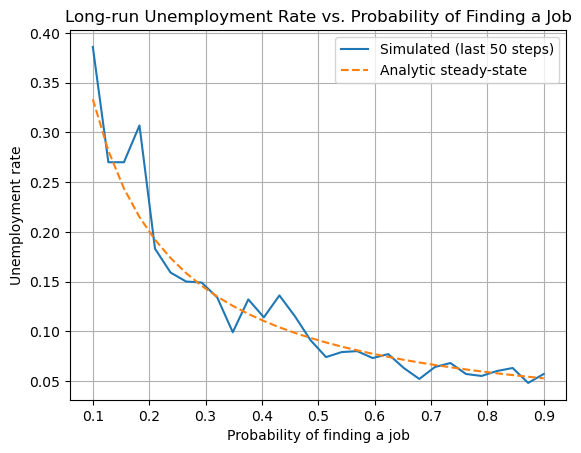
Figure 3: Steady state unemployment levels as a function of \(p_{hired}\)
Summary of what the code does
- Step 5: For a range of probabilities of finding a job, run the simulation and compute the average unemployment rate in the long run. Also compute the analytic steady-state unemployment rate:
\[ u = \frac{p_{\text{fired}}}{p_{\text{fired}} + p_{\text{hired}}} \]
- Step 6: Plot both the simulated and analytic results to compare.
Sweeping parameters is a powerful way to explore how a model behaves as you change its assumptions.
Summary
In this lecture we introduced Python by modeling two simple economic processes. The compounded interest model illustrated how repeated calculations over time can generate nonlinear growth. The employment dynamics model showed how stochastic processes can be simulated using probabilities and random draws.
You learned how to use variables, lists, and for-loops to simulate economic models step by step. We also introduced numerical libraries such as numpy and visualization tools such as matplotlib. Finally, we demonstrated how a parameter sweep can help analyze how sensitive model outcomes are to parameter choices.
Small economic mechanisms repeated over time—such as interest compounding or job flows—can generate large aggregate outcomes. Simulation helps economists understand these dynamics and explore how policy-relevant parameters affect long-run results.
Basic Python structures such as variables, lists, and
for-loops allow economists to simulate dynamic processes step by step. Libraries like numpy and matplotlib make it easy to compute and visualize the results of these simulations.
Looking ahead: In the next lecture we move from simple simulations to empirical economic analysis, using real data to estimate and interpret economic relationships.
Review Questions
Test your understanding of the Python concepts and models from this lecture. For each question:
- Explain what the code does.
- Complete the code in your own notebook.
Question 1 Predicting the Future Value
You want to predict the future value of a savings account after 10 years, but you only know the monthly deposit and the interest rate. You are given the following code fragment:
deposit = 100
rate = 0.004
months = 10 * 12
balance = 0
for m in range(months):
    # update balance here
- a. Without running the code, explain how the balance will grow over time.
- b. Write code to print the balance every year (not every month). Hint: find a Python operator to figure out whether a number can be divided by 12.
- c. How would you modify the code to allow for a one-time bonus deposit in month 24?
For this question you need to use an if statement. Google “if statements in python” or get help from an LLM to solve this. We come back to if statements in Lecture 3: Modeling Iteration.
Hint
click here
- To print the balance every year, use an
ifstatement inside the loop:if m % 12 == 0: print(m//12, balance) - To add a bonus in month 24:
if m == 24: balance += bonus - Google or ask an LLM the difference between the python statements
x = 10andx == 10(we come back this in the next lecture).
Question 2 Unemployment Fluctuations
Suppose you want to simulate unemployment in a village, but you want to track the longest streak of consecutive months where unemployment is above 5 people.
n_people = 20
employed = n_people
unemployed = 0
p_fired = 0.05
p_hired = 0.10
longest_streak = 0
current_streak = 0
for month in range(months):
    # update employed and unemployed here
    if unemployed > 5:
        # update streaks here
- a. Explain how you would update
employedandunemployedeach month. - b. Complete the code to track the longest streak of high unemployment.
Hint
click here
- For streaks:
- If
unemployed > 5, incrementcurrent_streak. - If not, reset
current_streakto 0. - If
current_streak > longest_streak, updatelongest_streak.
- If
Question 3 Parameter Sweep Analysis
You want to analyze how the average unemployment rate over ten month period (not steady state unemployment) changes as you sweep the probability of being fired.
Run a simulation for each value of p_valued and store the results in a list.
Plot the results so that the x-axis shows the probability of being fired and the y-axis shows the average unemployment rate?
Question 4 Individual Employment History
In order to illustrate that employment/unemployment is a dynamic process, choose values for the probability of being hired/fired and show the employment history of one individual across 20 periods.
Lecture 2: Healthcare expenditure
Skills you learn in this lecture: working with real economic data, numerical optimization, interpreting empirical models.
Learning objectives
After completing this lecture you should be able to:
- load and inspect datasets using
pandas - visualize economic data using
matplotlib - define and use Python functions
- estimate model parameters using numerical optimization
Introduction
Newspaper articles argue that healthcare expenditure in Western countries (including the Netherlands) are getting out of control. To see how bad the situation is, we look at Eurostat data and estimate a simple model. We start with a linear trend and then add other variables. If we want to use demand-side cost-sharing to keep expenditure constant, how high should out-of-pocket expenditure be?
In this lecture we analyze healthcare expenditure using real data for the Netherlands. We start by visualizing how healthcare expenditure per capita has evolved over time. Next, we construct a simple linear trend model and examine how well it fits the data.
We then estimate the best fitting parameters using numerical optimization and interpret the resulting regression line. Finally, we extend the model by including additional explanatory variables such as GDP per capita and out-of-pocket healthcare spending.
The goal of this lecture is to demonstrate how Python can be used for empirical economic analysis: reading data, estimating models, and exploring policy implications.
App
Healthcare expenditure
In the app below, we use data from Eurostat to visualize how healthcare expenditure has developed over time in the Netherlands. To predict how expenditure develops till the year 2050 we estimate a linear trend. First, you can use the sliders to create a trend yourself and then we estimate the trend using ordinary least squares (OLS). OLS minimizes the sum of the squared errors to find the best fitting intercept and slope (time trend). We visualize the errors and the OLS time trend.
Then we extrapolate the time trend till 2050. According to this model, healthcare expenditure per head will become almost 9000 euro in 2050. This prediction is not necessarily realistic. To illustrate, the government may well change policies to curb expenditure growth. One option is demand-side cost-sharing. In the Netherlands we have a deductible. Our data has information on which percentage of healthcare expenditure is paid for out-of-pocket.
In order to understand which percentage needs to be paid out-of-pocket to keep expenditure constant, we estimate a model with this variable in it. To solve for this percentage of out-of-pocket expenditure and to estimate the OLS regressions we use the optimize library from scipy.
If the app does not load, open it in a new tab .
Python Code Explanation
1. Reading the data
We use pandas to read the csv file with healthcare expenditure data for the Netherlands over the years 2000-2024. Here we just use the pd.read_csv function, but with pandas you can also manipulate, clean data and merge dataframes. In the function call we specify the path where the csv file can be found in our repository: './data/gdp_healthcare_nl.csv'. Make sure you create a folder data in your current working directory and save the data from here into this folder.1
With df.head() we can look at the first five rows of the dataframe (df.head(10) for the first ten rows). To view the last five rows, use df.tail().
import pandas as pd

df = pd.read_csv('./data/gdp_healthcare_nl.csv')
df.head()
| Year | GDP_per_head | CHE_per_head | oop |
|---|---|---|---|
| 2000 | 48561.827540 | 3660.652613 | 11.031692 |
| 2001 | 50301.690772 | 3879.911114 | 10.466823 |
| 2002 | 53515.311837 | 4137.932375 | 9.812201 |
| 2003 | 55703.272834 | 4311.324170 | 9.605323 |
| 2004 | 55797.445718 | 4405.689931 | 9.960184 |
The columns/variables in this dataframe df are the year of observation, GDP per head, healthcare expenditure per head and the percentage of healthcare expenditure that people pay out-of-pocket; CHE refers to current health expenditure and oop the percentage of CHE paid out-of-pocket.
2. Plotting the data
We use matplotlib to plot healthcare expenditure per head, CHE_per_head, over time. Use google or an LLM to find out what plt.grid, plt.tight_layout do.
import matplotlib.pyplot as plt

plt.figure(figsize=(8,5))
plt.plot(df.Year, df.CHE_per_head, marker='o', color='orange')
plt.xlabel('Year')
plt.ylabel('Healthcare Expenditure per head (Euros)')
plt.title('Healthcare Expenditure per head in the Netherlands')
plt.grid(True)
plt.tight_layout()
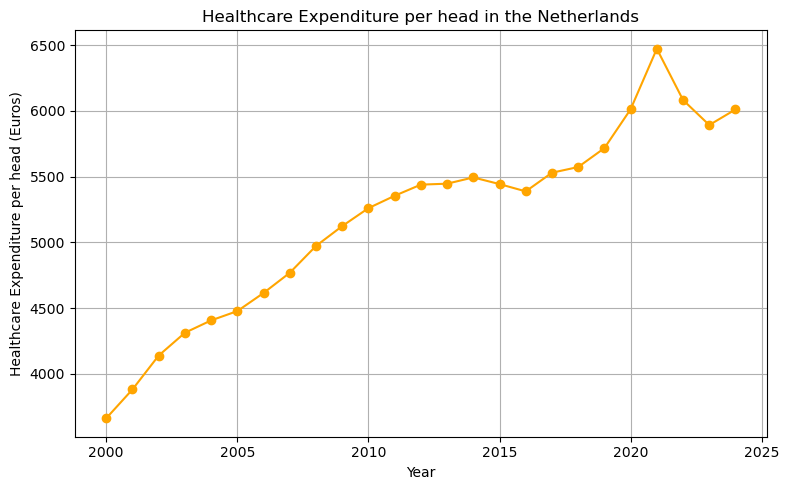
Figure 4: Dutch healthcare expenditure per head over time
When you plot data, like the time series on healthcare expenditure above, always think: “does this make sense?” Can I explain the pattern that I see? Here the two patterns to pay attention to would be: (i) the series is increasing over time; is this in line with what I know about his series? (ii) why is there a spike in 2021?
3. Defining a linear trend function
Now we define our first function in Python. A function is a reusable block of code. Here, we define a function to compute a linear trend. We start with the keyword def to specify the name of the function (which you are free to choose yourself but there are some restrictions on the name you choose) and then between parentheses ’()’ you specify the arguments of the function. That is, the variables that the function needs to calculate its results.
Here, the function has three arguments: years, intercept and slope. The function returns intercept + slope * (years - years[0]). Although this is not clear from the function definition, intercept and slope will be scalars and years is a vector (actually a pandas series). The syntax [0] chooses the first element of this series (remember Python starts counting/indexing at 0). With df.Year as loaded from our data above, df.Year[0] equals 2000. The intercept equals linear_trend in the year 2000 and the trend slope applies to years \(> 2000\).
def linear_trend(years, intercept, slope):
    return intercept + slope * (years - years[0])
If you want to practice with defining (simpler) functions, do something like the following in your marimo notebook. Note that x**2 is Python syntax for \(x^2\).
def f(x):
    return x**2

range_x = np.linspace(-1,1,50)
plt.plot(range_x,f(range_x));
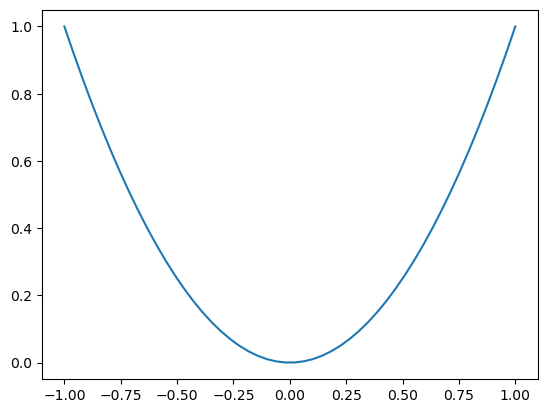
Figure 5: A simple parabola
4. Fitting and visualizing the trend
We plot the data, the linear trend, and the residuals (shown as vertical differences). Since the variable years is a vector, the function linear_trend returns a vector as well (a value for each year in years).
The Python syntax zip(years,che,trend) creates the combinations of the variables years,che,trend. After running the code block below in your marimo notebook (to make sure the variables are defined) you can evaluate for x, y, yhat in zip(years, che, trend): print(x, y, yhat) to see what zip does.
Finally, there is a new matplotlib command: plt.vlines: you give it three arguments: the \(x\) coordinate, the low value and high value for the \(y\) coordinate between which a vertical line is drawn. linestyle=':' creates a dotted line. Use google or an LLM to figure out what alpha=0.7 means.
years = df.Year
che = df.CHE_per_head
intercept = 3660.0
slope = 126.0
trend = linear_trend(years, intercept, slope)

plt.figure(figsize=(8,5))
plt.plot(years, che, marker='o', label='Data', color='orange')
plt.plot(years, trend, label='Linear Trend', color='blue')
for x, y, yhat in zip(years, che, trend):
    plt.vlines(x, min(y, yhat), max(y, yhat), color='gray', linestyle=':', alpha=0.7)
plt.xlabel('Year')
plt.ylabel('Healthcare Expenditure per head (Euros)')
plt.title('Data, Linear Trend, and Residuals: OLS explanation')
plt.legend()
plt.grid(True)
plt.tight_layout()
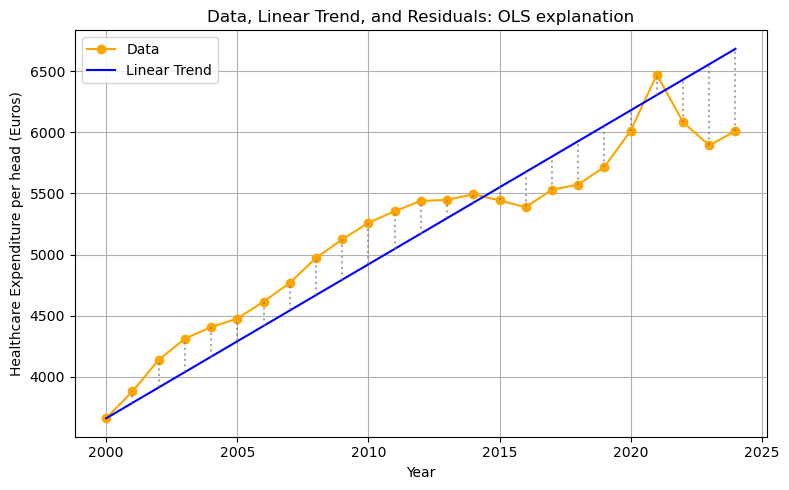
Figure 6: Graphical illustration of residuals: difference between the data and the prediction of the linear model
5. Using optimization to find the best fit
Above we just chose some values for intercept and slope. Now we will try to find the values that give the best fit. We follow OLS in defining “best” as minimizing the sum of squared residuals (the vertical lines in the figure above).
We use scipy.optimize.minimize to find the intercept and slope that minimize the sum of squared residuals. We define the function rss which has as arguments the parameters (intercept and slope), the years (independent variable) and current healthcare expenditure che (defined in the code block above) as dependent variable. By specifying y = che (or years=years) in the function definition of rss we give the function default values: if we do not specify y (or years) in our function call, Python will work with the specified default values for these variable.
Within the function definition of rss we call the function linear_trend that we defined above. The function np.sum sums the vector in its argument. To see how this works, run the code np.sum(np.arange(4)) in your marimo notebook.
The function minimize from scipy expects (at least) two arguments: the function that needs to be minimized (rss in this case) and an initial guess for the parameters, x0. We specify our initial guess as intercept = slope = 0 via x0 = [0,0].
The outcome of the minimization routine is captured in the variable res. After running the following code block in your notebook, you can evaluate res. This variable res has the Python type dictionary and one of the keys is x: the x value where the function rss is minimized. It contains the optimal intercept and optimal slope.
from scipy.optimize import minimize
import numpy as np

def rss(params, years=years, y=che):
    intercept, slope = params
    yhat = linear_trend(years, intercept, slope)
    return np.sum((y - yhat) ** 2)

res = minimize(rss, x0=[0, 0])
opt_intercept, opt_slope = res.x
print(res.x)
[4038.28744808 95.04245392]
6. Visualizing the optimal fit
Now we can plot our data with the time trend that gives the best fit. To find the OLS regression line, we call our function linear_trend with the years variable and the optimal values opt_intercept, opt_slope defined above.
opt_trend = linear_trend(years, opt_intercept, opt_slope)

plt.figure(figsize=(8,5))
plt.plot(years, che, marker='o', label='Data', color='tab:orange')
plt.plot(years, opt_trend, label='OLS Linear Fit', color='tab:blue')
for x, y, yhat in zip(years, che, opt_trend):
    plt.vlines(x, min(y, yhat), max(y, yhat), color='gray', linestyle=':', alpha=0.7)
plt.xlabel('Year')
plt.ylabel('Healthcare Expenditure per head (Euros)')
plt.title('OLS fit: Linear Trend and Residuals')
plt.legend()
plt.grid(True)
plt.tight_layout()
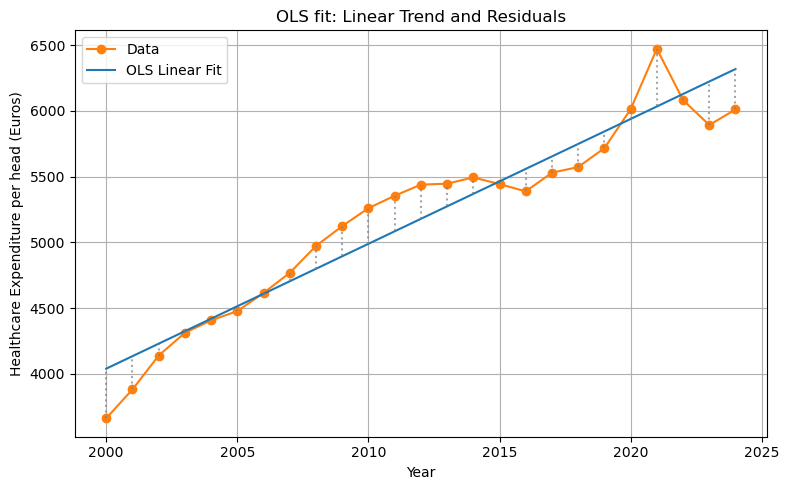
Figure 7: The residuals of the OLS fit
7. Extending the model
The fit of the OLS estimation is not bad. But we only used time (years) as explanatory variable. As healthcare is most likely a normal good, one would expect citizens to spend more on healthcare if they have higher incomes. On the macro level we can capture this with GDP per capita. Next to income, price is usually a determinant of expenditure on a good. Because the Netherlands has health insurance, people do not pay the full price of healthcare. But the deductible (part of healthcare expenditure that a patient pays her/himself) tends to reduce expenditure. Here we capture demand-side cost-sharing with the percentage that patients pay out-of-pocket (oop) for healthcare.
Below we will add these variables to our OLS regression to improve the fit.
8. Extrapolating the OLS Linear Trend to 2050
We can use the OLS parameters to extrapolate the linear trend far into the future, for example to the year 2050. With the current information/data that we have, how much do we expect Dutch citizens to spend on healthcare (per capita) in 2050?
In order to predict (extrapolate) healthcare expenditure in 2050, we use our OLS regression line and substitute years till 2050 in the regression.
We define a new variable future_years starting from the first year (selecting using [] and index 0) and up till (but not including) 2051. Python starts counting at 0 and when specifying a range with range or np.arange the end point is not included.
future_years = np.arange(df.Year[0], 2051)
future_trend = linear_trend(future_years, opt_intercept, opt_slope)

plt.figure(figsize=(10,5))
plt.plot(df.Year, df.CHE_per_head, marker='o', label='Observed Data', color='orange')
plt.plot(future_years, future_trend, label='OLS Linear Extrapolation (to 2050)', color='blue')
plt.xlabel('Year')
plt.ylabel('Healthcare Expenditure per head (Euros)')
plt.title('OLS Linear Extrapolation of Healthcare Expenditure per Head (to 2050)')
plt.legend()
plt.grid(True)
plt.tight_layout();
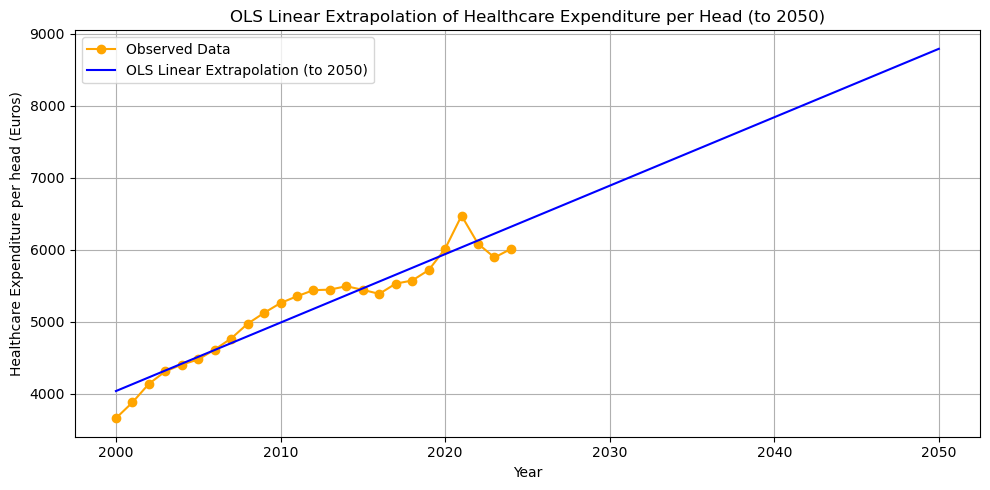
Figure 8: Extrapolating the linear model till the year 2050
The model predicts that healthcare expenditure will be almost 9000 euros per capita in 2050. This is not necessarily a convincing prediction. First, it is not obvious that the trend should be linear. Perhaps the relation over time is concave (like \(\ln(x)\)) and grows more slowly than a linear function would suggest. If the relation is convex (like exponential growth) the situation will be (far) worse in 2050 in terms of public finance.
Second, the linear trend predicts healthcare expenditure growth that (most likely) exceeds GDP growth. This cannot be sustained by an economy and the government is likely to adopt measures to slowdown the growth in healthcare expenditure. One option is to increase demand-side cost-sharing. As people have to pay more out-of-pocket for healthcare treatments, they will tend to consume less.
9. Multi-variable Regression: Adding GDP and OOP
We can improve the fit of the model by including additional covariates: GDP per head and the percentage of healthcare expenditure paid out-of-pocket (oop).
We define a new function for the sum of squared residuals, rss_multi, including the two new variables and the slopes for these variables.
def rss_multi(params, years=df.Year, gdp=df.GDP_per_head, oop=df.oop, y=df.CHE_per_head):
    intercept, slope_year, slope_gdp, slope_oop = params
    year_base = years - years[0]
    yhat = intercept + slope_year * year_base + slope_gdp * gdp + slope_oop * oop
    return np.sum((y - yhat) ** 2)

init_params = [0, 0, 0, 0]
res_multi = minimize(
    rss_multi,
    x0=init_params
)
opt_intercept_m, opt_slope_year, opt_slope_gdp, opt_slope_oop = res_multi.x

year_base = df.Year - df.Year[0]
che_hat_multi = (
    opt_intercept_m
    + opt_slope_year * year_base
    + opt_slope_gdp * df.GDP_per_head
    + opt_slope_oop * df.oop
)

plt.figure(figsize=(10,5))
plt.plot(df.Year, df.CHE_per_head, marker='o', label='Observed Data', color='orange')
plt.plot(df.Year, che_hat_multi, marker='s', label='Multi-variable Prediction', color='green')
plt.plot(df.Year, opt_trend, marker='x', label='OLS Linear Fit', color='blue', linestyle='--')
plt.xlabel('Year')
plt.ylabel('Healthcare Expenditure per head (Euros)')
plt.title('Observed vs Multi-variable Model Prediction')
plt.legend()
plt.grid(True)
plt.tight_layout();
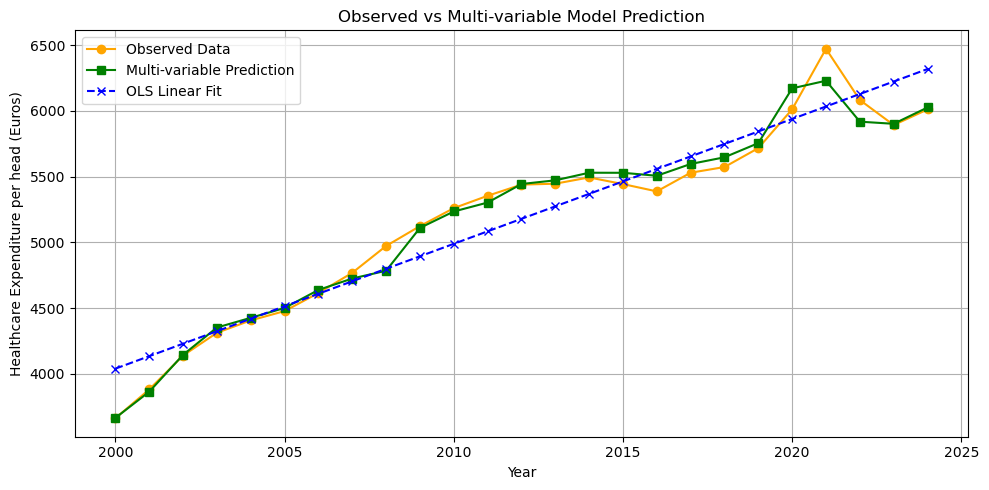
Figure 9: Predictions of the multi-variable OLS model
The fit is indeed better than the simple OLS linear trend: the multi-variable predictions are closer to the data than the predictions of the linear model.
The multi-variable model is also linear, why do its predictions not form a straight line in Figure 9?
10. Using a Numerical Solver (fsolve) to Find Required OOP Levels
Suppose the government wants to keep healthcare expenditure constant. How can we find, for each year 2015–2024, the level of oop needed to keep healthcare expenditure per head at the 2014 level.
We use scipy.optimize.fsolve to solve for oop numerically.
First, we define the years years_proj over which we need to derive oop to keep expenditure constant at the 2014 level che_2014. Then we select gdp_proj for these years. In pandas you can make a selection with the [] notation, e.g. df[df.Year==2014]. When testing whether a variables is equal to a value we use ’='; in Python '’ is used for variables assignment (x=5 sets the variable x equal to 5). When there is a range of values, we use the .isin method: select all years in the range years_proj.
As above, we choose the base year as the first year in our series (that is how we estimated our OLS regression).
We define a function oop_to_hold_che which returns the difference between our prediction of healthcare expenditure yhat and the expenditure level in 2014. We will try to find the oop level that sets this function equal to zero: the predicted expenditure equals the 2014 expenditure. oop_to_hold_che has two arguments: the oop level that we try to find and the year year_index for which we want to find the oop level.
Finally, the function fsolve needs as inputs: the function oop_to_hold_che that we want to set equal to zero and an initial guess for the solution. The function oop_to_hold_che has two arguments: oop and the year year_index that we are considering. We are not trying to choose year_index to set the function equal to zero. Hence, we need to tell Python explicitly that it should think of oop_to_hold_che as a function of oop only (for each year).
One way to do this would be to have different function names for oop_to_hold_che for each year, like oop_to_hold_che_2017. But this would be tedious. A better way is to use Python’s “anonymous” functions. These are functions without a name. You can define an anonymous function using the lambda keyword. As a silly example you can evaluate in your notebook is (lambda x: x + 5)(8); this gives an idea what a lambda function does.
We set oop_to_hold_che equal to zero for the years 2015-2024 and add these values of oop to the list oop_needed. As above, we first define the empty list oop_needed and append to this list in the for loop.
Then we plot this list together with the observed values of oop in our data.
from scipy.optimize import fsolve

che_2014 = df[df.Year == 2014]['CHE_per_head']
years_proj = np.arange(2015, 2025)
gdp_proj = df[df.Year.isin(years_proj)]['GDP_per_head'].values
year_base_proj = years_proj - df.Year[0]

def oop_to_hold_che(oop_guess,year_index):
    yhat = (
        opt_intercept_m
        + opt_slope_year * year_base_proj[year_index]
        + opt_slope_gdp * gdp_proj[year_index]
        + opt_slope_oop * oop_guess
    )
    return yhat - che_2014

oop_needed = []
for y in range(len(years_proj)):
    oop_init = df.oop[0]
    required_oop = fsolve(lambda x: oop_to_hold_che(x,y), oop_init)
    oop_needed.append(required_oop[0])

oop_data = df[df.Year.isin(years_proj)]['oop'].values

plt.figure(figsize=(8,5))
plt.plot(years_proj, oop_data, marker='o', label='Actual OOP')
plt.plot(years_proj, oop_needed, marker='s', label='Required OOP to hold CHE fixed\n(at 2014 level)')
plt.xlabel('Year')
plt.ylabel('Out-of-pocket (% of CHE)')
plt.title('OOP Levels Needed to Hold Healthcare Expenditure per Head Constant (2015-2024)')
plt.legend()
plt.grid(True)
plt.tight_layout();
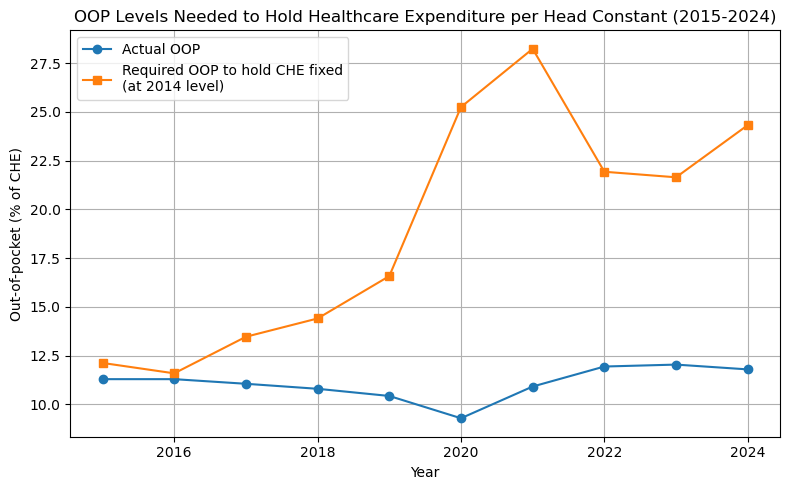
Figure 10: Percentage of healthcare expenditure that needs to be paid out-of-pocket to keep expenditure per capita at its 2014 level.
Can you explain the shape of the required OOP line in Figure 10?
Summary of what the code does
- Reading the data: Load the healthcare expenditure, GDP per head, and out-of-pocket (oop) data into a
pandasdataframe. - Plotting the data: Visualize healthcare expenditure per head over time using
matplotlib. - Defining a linear trend function: Create a Python function that computes a linear trend given years, intercept, and slope.
- Fitting and visualizing the trend: Plot the data, an example linear trend, and show residuals (vertical differences between data and trend).
- Using optimization to find the best fit: Use
scipy.optimize.minimizeto find the intercept and slope that minimize the sum of squared residuals (OLS fit). - Visualizing the optimal fit: Plot the data and the resulting OLS regression line with residuals.
- Extending the model: only using time as explanatory variable is limited; other variables like income (GDP per head) and patient payments (oop) may matter.
- Extrapolating the OLS Linear Trend to 2050: Use the OLS results to predict future healthcare expenditure up to 2050 and plot the (possibly unrealistic) extrapolation.
- Multi-variable Regression: Improve the fit by adding GDP per head and oop as covariates in a multi-variable regression, and compare the fitted values to the data and simple trend.
- Using a Numerical Solver (
fsolve): For each future year, usefsolveto determine the oop needed to keep expenditure constant at 2014 levels, plot the required vs. actual oop.
Summary
In this lecture we used data on healthcare expenditure in the Netherlands to illustrate how economists combine empirical data with simple models. We first explored the data visually and then estimated a linear trend using numerical optimization.
We also showed how adding additional explanatory variables such as GDP per capita and out-of-pocket payments can improve the explanatory power of the model. Finally, we used the estimated model to perform policy-oriented simulations, such as determining how changes in out-of-pocket payments could affect healthcare expenditure.
Empirical economic analysis combines theory, data, and statistical estimation. Even simple regression models can provide useful insights into economic trends and help explore the potential effects of policy changes.
Working with real economic data requires tools such as
pandas for data handling and Python functions for reusable code. Numerical optimization can then be used to estimate economic relationships such as regression models.
Looking ahead: In the next lecture we study iterative economic models, where equilibrium emerges through repeated adjustments of agents over time.
Review Questions
Question 1: Create Your Own Multi-variable Regression
Fit a new regression model that predicts healthcare expenditure per head using only GDP per head (not year or oop). Plot the predicted values versus the actual data. How does the fit compare to the simple linear trend?
Hint
click here
Define a function like:
  def rss_gdp(params, gdp=df.GDP_per_head, y=df.CHE_per_head):
      # complete the code
      return np.sum((y - yhat) ** 2)
Question 2: Use fsolve to Find the GDP Needed to Keep Expenditure Constant
Suppose you want to know, for a certain year (e.g., 2024), what value of GDP per head would keep healthcare expenditure fixed at its 2014 level, holding all else constant. Write a function and use fsolve to solve for this GDP value using your multi-variable model from the previous question.
Hint
click here
- Use your multi-variable coefficients from a previous regression.
Your function for
fsolvecould look like:def gdp_to_hold_che(gdp_guess): yhat = # complete the code return yhat - che_2014
Question 3: Analyze the following three functions
For each of the following functions, do the following:
- plot the function on \(x \in [-10,10]\),
- find the zeros of the function (that is, the values of \(x\) where \(f(x)=0\)) on this interval,
- find the extrema (minimum, maximum) of the functions on \([-10,10]\).
The functions are: \(f(x) = x^3 - 3x + 1\), \(g(x) = \sin(2x)\) and \(h(x) = x^2 - 6 \sin(x)\).
Use google or an LLM to find the relevant Python functions for this. Python has only functions to minimize, how do you maximize a function? Most routines require you to specify a starting point of the algorithm. How does the starting point affect the outcome?
Lecture 3: Modeling Iteration
Skills you learn in this lecture: iterative equilibrium computation, fixed point equilibrium calculation, interactive apps with sliders, modeling economic dynamics with difference equations.
Learning objectives
After completing this lecture you should be able to:
- create interactive applications using Python and
marimo - define sliders for model parameters and use them in simulations
- implement conditional logic using
if,elif, andelsestatements - simulate iterative economic processes using
forloops - explain how iterative adjustment processes lead to economic equilibria
- calculate equilibria with solving fixed point equations
- represent dynamic economic systems using difference equations and matrix notation
Introduction
Many economic models describe processes that evolve step by step over time. In this lecture we study such iterative dynamics using Python. We implement models in which economic variables adjust repeatedly until they converge to an equilibrium.
The lecture uses three examples to illustrate iteration. First, we analyze an adverse selection market where prices update based on expected quality. Second, we study a Cournot duopoly where firms repeatedly best respond to each other. Third, we simulate a labor market with transitions between unemployment and different job types.
These examples demonstrate how Python can be used to simulate dynamic economic systems and visualize how equilibria emerge through iteration. This visualization helps to gain intuition on the particular equilibrium outcome, it is not the best way to derive the equilibrium. For this we solve a fixed point equation.
Latex interlude
In this lecture we display quite a lot of math using Latex to introduce the economic models. In a marimo notebook you can use Latex in Markdown (instead of code) cells.
Here we give a very brief introduction to Markdown and Latex. You can google to find more elaborate introductions on the web.
Markdown is a so-called mark-up language. Using simple syntax, you can create (sub)headings, bullet lists, web links etc. Type the following in a Markdown cell in marimo and see how it is rendered. If you want other things (e.g. a footnote), just google “Markdown footnotes” and you find a website explaining how this is done.
# this is a heading
## subheading
* first bullet
* second bullet
[link text](actual link, e.g. http://www.etc)

To type math (and in economics that tends to involve Greek letters), copy the following in a Markdown cell in marimo and see how it is rendered.
    $x^2$, $\beta$, $\sqrt{9}$, $\frac{1}{2}$, $\bar x$

    \begin{equation}

    a^2 + b^2 = c^2

    \end{equation}
If you need something else, again just google; e.g. google “latex phi” or google “latex empty set” etc. If you want to write your thesis in Latex, you can download it here.
Apps
In terms of economics, we consider three models:
- an adverse selection model and how the market can unravel with asymmetric information,
- a duopoly Cournot model and how best-response iterations lead to the Nash equilibrium,
- a dynamic labor market model with three states: unemployed, low wage jobs, high wage jobs.
Adverse selection dynamics
People sometimes wonder why health insurance in the Netherlands is mandatory and not a (voluntary) choice by consumers. Think of creating an app which shows how markets with asymmetric information can unravel and lead to inefficient outcomes.
The following app models an adverse selection market. Well known examples of such markets are the second-hand car markets (with “lemons”) and (health) insurance markets. In each of these markets there is asymmetric information. The seller of the car has used the car herself. She knows how (aggressively) she has driven the car, taken care of the car, her investments in car maintenance etc. For the buyer this is not so clear. In the health insurance market, the insurer offers contracts to insure healthcare costs. The consumer has more information on his own health than the insurer does. Does he have a (chronic) disease? Does he have a healthy diet, exercise regularly etc.
The equilibrium in these markets tends to be inefficient: there is less trade than would be optimal from a welfare point of view. With the next app you can see how this inefficiency is affected by parameter values.
One interpretation of the iteration in the app is that agents react to what they saw in the previous period. In a health insurance context this would be: an insurer sells a health insurance contract, some consumers buy the contract and the price of the contract in the next period is the average costs of the contract in this period. If this price is rather high, some healthy people will decide not to buy health insurance because it is too expensive. This increases the average cost of the contract for the insurer (conditional on buying the contract, the customers have lower health status and higher healthcare expenditure). So in period 3 the insurance premium increases again, perhaps inducing some of the healthier customers to forego insurance etc.
This process is called the unraveling of the market or a death spiral.
The context of the app is more like the second-hand car market: sellers value their car at \(q\) and are willing to sell to any buyer who pays a price above \(q\). Each car is worth more to the buyer than to the seller but the buyer cannot observe \(q\). If people are only willing to sell their car if \(q \leq p\) the buyer’s expectation of quality is given by \(E(q|q \leq p)\). By assumption the car has more value for the buyer than the seller, hence the buyer is willing to pay a markup over \(E(q|q \leq p)\) to buy the car. Which share of cars are going to be traded in the market?
If the app does not load, open it in a new tab .
Cournot best response dynamics
Consider two profit maximizing firms in a market. Each firm wants to choose an optimal reaction to the other firm’s action, but then the “other firm” also reacts to the first firm’s choice of action. Is this not an infinite loop with no ending? Think of an app that can show this iterated reaction to the other firm and how this converges to (Nash) equilibrium.
This app considers a Cournot market with two firms producing a homogenous good at constant marginal cost \(c\). Demand is of the form \(p = p(q_1+q_2)\). Hence, firm \(i\) maximizes profits
\begin{equation} \pi_i = \max_q p(q+q_j)q - c q \end{equation}with \(j \neq i \in \{1,2\}\) taking the output of the other firm as given.
Assume that demand is linear: \(p(q_1+q_2)=1-q_1-q_2\). Take the first order condition, say for firm 1, and show that this can be written as \(1-2q_1-q_2-c=0\) and derive the optimal reaction function \(r_1(q_1)\) shown in the app.
One way to derive the Nash equilibium is to use iterated best responses: start with an initial guess for \(q_1\) denoted by \(q_1^0\). Calculate firm 2’s optimal reaction: \(q_2^1=r_2(q_1^0)\). Then find 1’s optimal reaction to this: \(q_1^2 = r_1(q_2^1)\) etc. The figure shows you this process. In this case, these iterations converge to the Nash equilibrium.
If the app does not load, open it in a new tab .
Unemployment dynamics
Sometimes the state of the labor market is summarized simply by the unemployment rate; but not all employment is equal. People can learn on the job and become more productive in their work. Think of an app that illustrates different employment states. Is it the case that more people in high wage jobs lead to lower unemployment than when these people are in low wage jobs?
Suppose we have an inelastic labor supply normalized to a mass of 1. Labor can be in one of three states: unemployed, employed in a low wage job and employed in a high wage job. With transition equations we can keep track of the development over time of the fraction of people in each of these three states.
If the app does not load, open it in a new tab .
Click here if you need a matrix multiplication refresher
Matrix notation is nothing more than that: notation. However, it turns out to be very powerful. You have (probably) seen matrices before. The following clips give a short refresher.
First we give a simple example of matrix multiplication with numbers so you can check the calculations easily.
Using the same visuals as the clip above we show the equivalence of the transition equations in the app above.
Python Code Explanation
In this section we explain the Python code used to implement the models behind the interactive applications. The focus is on understanding how the economic mechanisms are translated into algorithms and simulations.
Adverse Selection Model
In the adverse selection model, sellers have goods of quality \(q\) uniformly distributed on \([v_0, v_1]\). Sellers only offer goods if the market price \(p > q\). Buyers value quality at a mark-up, they are willing to pay price \(p\) satisfying
\[ p = \mathrm{markup} \times E(q \mid q < p) \]
The equilibrium is found by iterating this price update until convergence.
Python code in Marimo:
We import the relevant libraries and define some interactive sliders.
import marimo as mo
import numpy as np
import matplotlib.pyplot as plt

v0 = mo.ui.slider(0, 100, value=50, label="Lowest quality $v_0$")
v1 = mo.ui.slider(1, 200, value=100, label="Highest quality $v_1$")
markup = mo.ui.slider(1.01, 2.0, value=1.2, step=0.01, label="Consumer mark-up")

mo.hstack([v0,v1,markup])
In marimo sliders are defined with mo.ui.slider, then give the starting value, the end value (a step, if the step is not one) and an initial value (the default value if the user does not actively choose a value). Also give the slider a label so that the user knows what it represents. Defining a slider does not imply that it shows up. Calling the slider with, say, v0 makes it visible to the user. With mo.hstack you can stack the sliders; here we stack them horizontally.
The function expected_q_given_p_uniform uses if statements to determine \(E(q|qelif statements as you like, Python goes over them in the order that you specify. Once one is satisfied, Python exits the if-statement. If none of the if or elif conditions are satisfied, Python evaluates the else statement and exits (hence there is no point in specifying more than one else clause).
def expected_q_given_p_uniform(p, a, b):
    if p < a:
        return 0
    elif p >= b:
        return (a + b) / 2
    else:
        return (a + p) / 2

def update_price_uniform(p, a, b, markup):
    expected_q = expected_q_given_p_uniform(p, a, b)
    return markup * expected_q

p = markup.value * v1.value
history = []
for _ in range(50):
    history.append(p)
    new_p = update_price_uniform(p, v0.value, v1.value, markup.value)
    if abs(new_p - p) < 1e-6:
        break
    p = new_p
plt.plot(history)
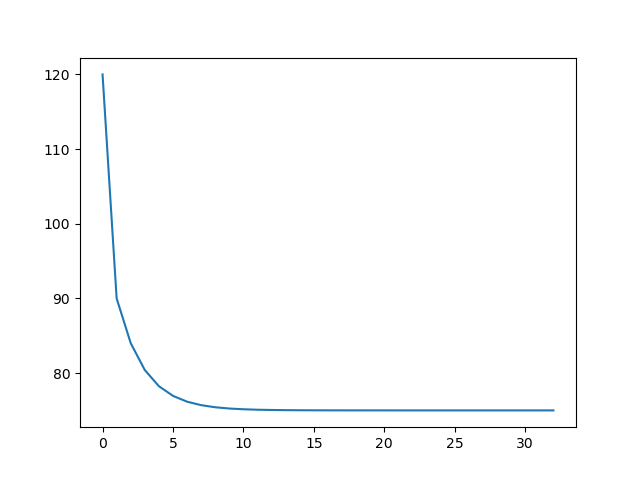
Figure 11: Development of price in an adverse selection market with \(v0=50,v1=100,markup=1.2\).
The code above uses marimo sliders for the parameter values. If you want to refer to the value of a slider use .value like v0.value. In other words, v0 refers to the slider itself and v0.value to the value that is selected with the slider.
The function expected_q_given_p_uniform computes the expected quality conditional on \(q < p\). With a uniform distribution and \(p \in [a,b]\), this expectation equals \((a+p)/2\). The if statements deal with the edge cases \(p < a\) and \(p > b\). Given expected_q, we can calculate the price that consumers are willing to pay, using the markup. We start at the highest possible price \(p = \text{markup} v1\) and iterate over the prices by adjusting the expectation based on “last period’s” price. The price update is iterated until convergence: the new price is very close to previous period’s price and we reach steady state. If you do not understand what 1e-6 means, use google or an LLM.
We leave it to you to add labels to the axes, a title etc. and to create the second plot in the app: the function \(markup \times E(q|q \le p)\) together with the 45 degree line.
calculate the equilibrium
The iterative process above explains why adverse selection markets (partially) unravel. Although every trade between a buyer and seller is valuable from a social point of view (each buyer values the product more than the seller), not all trades are realized in equilibrium.
But the iterative process is not the best way to calculate the equilibrium outcome: (i) it is not very efficient/fast and (ii) it is hard to understand for someone reading your code.
When you need to calculate an equilibrium, solve a fixed point equation; in this case a fixed point in the equilibrium price \(p\).
A fixed point of the function \(f(p)\) is a value of \(p\) that satisfies \(p = f(p)\). When \(p\) is a scalar, this is the value of \(p\) where \(f(p)\) crosses the 45 degree line. In other words, the function \(f\) maps \(p\) into itself: a fixed point.
In our application \(f(p) = markup * E(q|q \le p)\). For \(p\) satisfying \(p = markup * E(q|q \le p)\) we have an equilibrium price.
To program this, we choose values for the parameters (or substitute the sliders’ values), use the function expected_q_given_p_uniform from above to define the fixed point function and then use fsolve from scipy’s optimize library to find the equilibrium price. See the previous lecture for the fsolve function.
import scipy as sc
v0 = 50
v1 = 100
markup = 1.2

def fixed_point_lemons(p):
    return p - markup * expected_q_given_p_uniform(p,v0,v1)

sc.optimize.fsolve(fixed_point_lemons,[v1])
array([75.])
Cournot Duopoly Model
In the Cournot model, two firms choose quantities \(q_1\) and \(q_2\). The market price is
\[ p = 1 - q_1 - q_2 \]
and each firm has marginal cost \(c\). The best response functions are:
\[ q_1 = r_1(q_2) = \frac{1 - q_2 - c}{2}, \qquad q_2 = r_2(q_1) = \frac{1 - q_1 - c}{2} \]
To get an intuition for the Nash equilibrium, let’s think of the firms as sequentially reacting to the other’s choice of output. We can plot their reactions and see convergence to the Nash equilibrium.
However, to calculate the Nash equilibrium we solve a fixed point equation.
Python code in Marimo:
We import libraries and define sliders.
import marimo as mo
import numpy as np
import matplotlib.pyplot as plt

c = mo.ui.slider(0, 0.99, value=0.2, step=0.01, label="Marginal cost $c$")
q1_init = mo.ui.slider(0, 0.99, value=0.45, step=0.01, label="Initial $q_1$")
n_iter = mo.ui.slider(2, 30, value=14, step=1, label="Number of iterations")
mo.hstack([c,q1_init,n_iter])
In the following code block, the syntax i % 2 == 0 is a test whether \(i\) is either an even or odd number. Why do we only define one function reaction and not two functions like reaction1 and reaction2?
def reaction(q, c):
    return (1 - q - c) / 2

q1 = q1_init.value
points = []
for i in range(n_iter.value):
    if i % 2 == 0:
        q2 = reaction(q1, c.value)
        points.append((q1, q2))
    else:
        q1 = reaction(q2, c.value)
        points.append((q1, q2))
plt.plot(np.array(points)[:,0],np.array(points)[:,1])
plt.scatter(*points[0],label="initial $q_1$")
plt.legend()
plt.xlabel('$q_1$')
plt.ylabel('$q_2$')
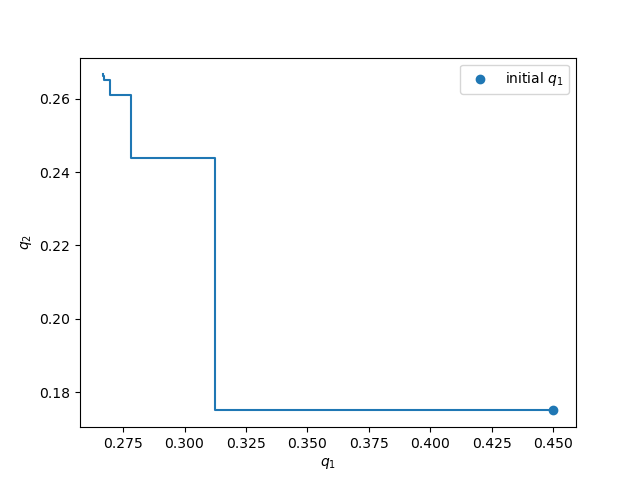
Figure 12: Cournot sequential optimal reactions
The code above shows how the Cournot best responses are iterated, starting from an initial \(q_1 = 0.45\). We leave it to you to add the reaction functions themselves into the graph (as we did in the app above).
From scipy.optimize use either the root function or fsolve (as above) to calculate the Cournot equilibrium. In the lemons example above we had a fixed point \(p = f(p)\) where \(p\) is a scalar. Here we have \(q = g(q)\) where \(q\) is a vector \(q = [q1, q2]\) and \(g\) is a vector function: \(g(q) = [r_1(q),r_2(q)]\) where \(r_i\) is firm \(i\)’s reaction function.
You can use an LLM to help you derive the Cournot Nash equilibrium.
Hint
Click here
- Define a function like:
def fixed_point(x,c):
    q1, q2 = x
    return  [
        # q1 minus firm 1's optimal response,
        # q2 minus firm 2's optimal response
    ]
Call scipy.optimize.root with the function and a starting point for the algorithm.
Labour Market Markov Model
The labor market model has three states: unemployed (\(u\)), low wage (\(l\)), and high wage (\(h\)). The transitions are:
- \(\mu\): probability an unemployed worker finds a low wage job
- \(\lambda\): probability a low wage worker becomes high wage
- \(\delta_l\): probability a low wage worker loses their job
- \(\delta_h\): probability a high wage worker loses their job
The difference equations are:
\begin{align*} u_{t+1} &= u_t + \delta_l l_t + \delta_h h_t - \mu u_t \\ l_{t+1} &= l_t + \mu u_t - \lambda l_t - \delta_l l_t \\ h_{t+1} &= h_t + \lambda l_t - \delta_h h_t \end{align*}Python code in Marimo:
We start by importing libraries and defining some sliders.
import marimo as mo
import numpy as np
import matplotlib.pyplot as plt

mu = mo.ui.slider(0.01, 0.5, value=0.1, step=0.01, label="Job finding rate $\mu$")
lambda_ = mo.ui.slider(0.01, 0.5, value=0.15, step=0.01, label="Learning rate $\lambda$")
delta_l = mo.ui.slider(0.01, 0.5, value=0.05, step=0.01, label="Low wage sep. $\delta_l$")
delta_h = mo.ui.slider(0.01, 0.5, value=0.02, step=0.01, label="High wage sep. $\delta_h$")
u0 = mo.ui.slider(0.0, 1.0, value=1.0, step=0.01, label="Initial unemployment $u_0$")

mo.hstack([mu,lambda_,delta_l,delta_h,u0])
Why do we denote the slider lambda_ and not just lambda?
First, we solve this model with appending lists with the per period solution as we have done above. Then we use matrix algebra to solve for the equilibrium paths.
We create three (empty) lists to keep track of the three fractions: unemployed, low wage and high wage job. We assume that at the start of the period all employed workers are in low wage jobs.
T = 60
u_hist, l_hist, h_hist = [], [], []
u, l, h = u0.value, 1 - u0.value, 0.0

for t in range(T):
    u_hist.append(u)
    l_hist.append(l)
    h_hist.append(h)
    new_l = mu.value * u
    l_to_h = lambda_.value * l
    l_to_u = delta_l.value * l
    h_to_u = delta_h.value * h

    next_u = u + l_to_u + h_to_u - new_l
    next_l = l + new_l - l_to_h - l_to_u
    next_h = h + l_to_h - h_to_u

    u, l, h = next_u, next_l, next_h

plt.plot(u_hist,label="unemployment")
plt.plot(l_hist,label="low wage employment")
plt.plot(h_hist,label="high wage employment")
plt.legend()
plt.xlabel("time")
plt.ylabel("fraction employed/unemployed")
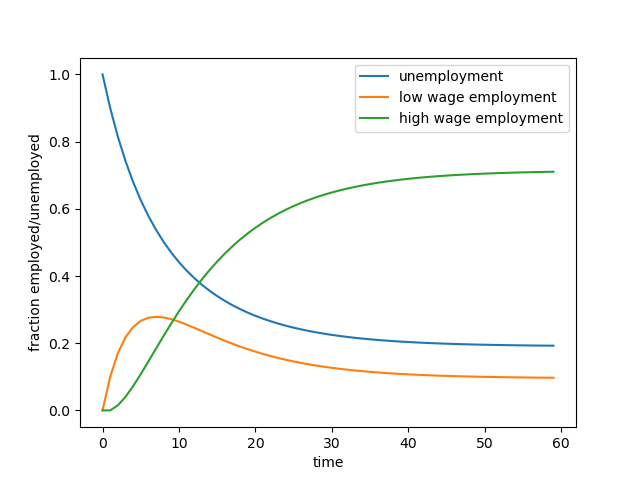
Figure 13: Employment Dynamics with high and low wage jobs
We can also derive the labor market dynamics using matrix notation in Python. We can rewrite the above difference equations as follows:
\begin{equation} \begin{bmatrix} u_{t+1} \\ l_{t+1} \\ h_{t+1} \end{bmatrix} = \begin{bmatrix} 1 - \mu & \delta_l & \delta_h \\ \mu & 1 - \lambda - \delta_l & 0 \\ 0 & \lambda & 1 - \delta_h \end{bmatrix} \begin{bmatrix} u_t \\ l_t \\ h_t \end{bmatrix} \end{equation}We can define the transition matrix as follows:
A = np.array([
    [1-mu.value, delta_l.value, delta_h.value],
    [mu.value, 1-lambda_.value-delta_l.value,0],
    [0, lambda_.value,1-delta_h.value]
])
And then derive the employment dynamics in the following way. Although this may look less intuitive at the start, note how much shorter the code is when we use matrix notation. Matrix multiplication is done by the np.dot() statement: \(A \cdot x\) is coded as np.dot(A,x). Note that for matrix multiplication to be well defined we need that the number of columns in \(A\) equals the number of rows in \(x\).
In the code below, \(A\) has 3 columns and 3 rows and \(S\) has 1 column and 3 rows.
S = np.array([u0.value, 1 - u0.value, 0.0]).reshape(3, 1)
for _ in range(T):
    S = np.hstack((S,np.dot(A,S[:,-1])))

plt.plot(S[0],label="unemployment")
plt.plot(S[1],label="low wage employment")
plt.plot(S[2],label="high wage employment")
plt.legend()
plt.xlabel("time")
plt.ylabel("fraction employed/unemployed")
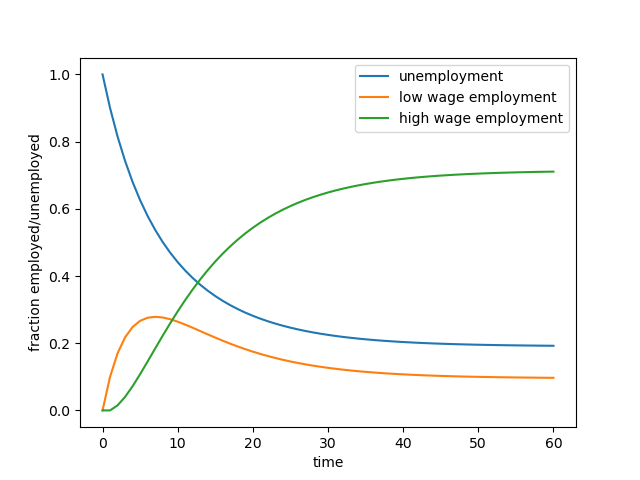
Figure 14: The same employment dynamics, now derived with matrix multiplication
In the code above, what does S[:,-1] mean? Evaluate the expression in your notebook or use an LLM to find out.
Summary
In this lecture we studied how iterative processes can be used to model economic dynamics. We implemented simulations where variables adjust repeatedly until they converge to equilibrium outcomes. We solved for equilibrium using a fixed point equation.
The adverse selection example illustrated how markets with asymmetric information may unravel through iterative price updates. The Cournot model showed how repeated best responses can lead firms toward the Nash equilibrium. Finally, the labor market example demonstrated how difference equations and transition matrices can be used to model dynamic systems.
These examples illustrate how Python is a powerful tool for solving for equilibria, exploring dynamic economic models and visualizing the paths through which equilibria emerge.
Many economic equilibria can be understood as the result of iterative adjustment processes. Simulating these dynamics helps reveal whether markets converge to stable outcomes or exhibit instability such as market unraveling.
Iterative algorithms and matrix operations allow Python to simulate how economic variables adjust over time. Tools from
numpy make it straightforward to implement these dynamics efficiently. Optimizing functions from scipy help to solve for equilibrium using fixed point equations.
Looking ahead: In the next lecture we apply these computational tools to structural economic models and explore how calibration can connect economic theory with quantitative predictions.
Review Questions
Question 1 Adverse Selection: Does Increasing Mark-Up Always Restore Trade?
Consider the adverse selection model with \(v_0=5\) and \(v_1=50\). Write Marimo code to:
- Plot the equilibrium price and fraction traded as the mark-up varies from 1.01 to 1.5.
- Is there always trade (fraction traded > 0) for any mark-up \(>1\)?
Hint
click here
Finish the code below:
import numpy as np
import matplotlib.pyplot as plt

v0, v1 = 5, 50
markups = np.linspace(1.01, 1.5, 100)
eq_prices = []
fractions = []

def expected_q_given_p_uniform(p, a, b):
    if p < a:
        return 0
    elif p >= b:
        return (a + b) / 2
    else:
        return (a + p) / 2

for m in markups:
    # solve for equilibrium price and fractions traded

plt.plot(markups, eq_prices, label="Equilibrium price")
plt.plot(markups, fractions, label="Fraction traded")
plt.xlabel("Markup")
plt.legend()
Question 2 Cournot Duopoly: Add a Third Firm
Modify the Cournot duopoly Python code so there are three firms, each with marginal cost \(c\), facing demand of the form \(p = 1 - q_1 - q_2 - q_3\).
- Define best-response functions
- Write a for loop to iterate best responses starting with initial quantities \(q_1=0.3, q_2=0.3, q_3=0.3\).
- Define a fixed point function and solve for the Cournot Nash equilibrium.
Hint
click here
Finish the code below; we will discuss the use of .copy() in class (or use an LLM to figure out what this does).
def r(q2, q3, c):
    return (1 - q2 - q3 - c)/2
c = 0.2
qs = [0.3, 0.3, 0.3]
history = [qs.copy()]
for i in range(15):
    qs[0] = r(qs[1], qs[2], c)
    # finish the code


plt.plot([row[0] for row in history], label='$q_1$')
plt.plot([row[1] for row in history], label='$q_2$')
plt.plot([row[2] for row in history], label='$q_3$')
plt.legend()
plt.xlabel("Step")
Question 3 Labor Market: Steady State with Fixed Point
Derive and plot the steady-state unemployment \(u^*\) as a function of the job-finding rate \(\mu\) (other parameters fixed at \(\lambda=0.1\), \(\delta_l=0.05\), \(\delta_h=0.03\)).
- Use the fact that in steady state, variables don’t change over time.
Hint
click here
Why do we divide by np.sum(x) in the definition of fixed_point? Use google or an LLM to figure out what ’broyden1’ means. Why do we use x[0] after optimize.root() and not just x?
import numpy as np
from scipy import optimize
import matplotlib.pyplot as plt

lambda_, delta_l, delta_h = 0.1, 0.05, 0.03
mus = np.linspace(0.01, 0.5, 100)
def matrix_A(mu):
 return np.array([
    [1-mu, delta_l, delta_h],
    [mu, 1-lambda_-delta_l,0],
    [0, lambda_,1-delta_h]
    ])

def fixed_point(x,mu):
    x = (x/np.sum(x)).reshape(3,1)
    return x - np.dot(matrix_A(mu),x)

u_star = []
for mu in mus:
    x = optimize.root(lambda x: fixed_point(x,mu), [1/3.0, 1/3.0, 1/3.0], method='broyden1', tol=1e-14).x[0]
    # finish the code
Question 4 Demand and Supply
Consider a market where there is one type of product and there is an exogenous endowment of this product (supply) equal to number_of_goods. Further, in this economy there are number_of_agents agents who have a valuation for this good which is randomly drawn from a normal distribution. An agent can at max. consume one unit of the product and her utility is then given by her valuation. The value of consuming zero units and the additional value of consuming more than one unit both equal 0.
The vector valuations contains for each agent her valuation. This we can code as follows:
number_of_agents = 1000
number_of_goods = 100
valuations = np.random.normal(100,20,size=number_of_agents)
- Define the function
demand(p)which gives the number of goods demanded at price \(p\). - Solve for the equilibrium price.
Question 5 Welfare and External Effects
Consider a Cournot duopoly market with a homogeneous good. Consumers have utility function \(u(x) = x - 0.5x^2\) and solve \(\max_x u(x) - px\). Firms produce at constant marginal costs normalized to zero: \(c=0\). But the production of \(x\) creates pollution at social cost \(ex\) with \(e \geq 0\).
- Derive analytically the demand function for this market.
- Define the reaction functions for the firms and the fixed point function; solve for the Cournot Nash equilibrium.
- Define a Python function for welfare, \(W\), for this market as a function of \(x\) and \(e\).
- Let \(W^*\) denote welfare as maximized by the social planner and \(W^{C}\) as the level of welfare in Cournot equilibrium. Give the Python code to replicate Figure 15.
- Given an economic interpretation of this figure.
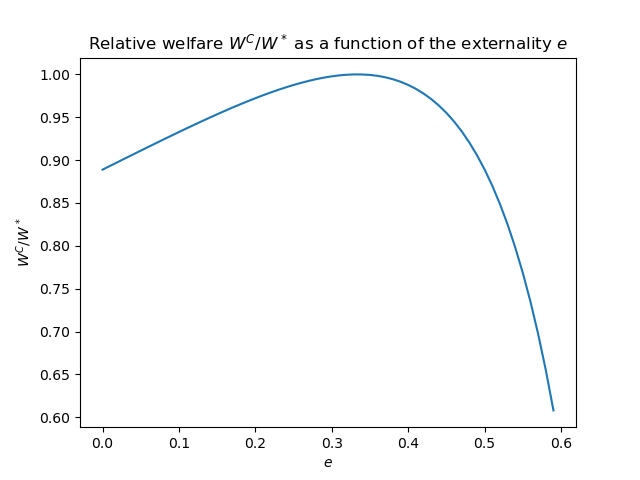
Figure 15: Cournot welfare as a fraction of socially optimal welfare \(W^*\)
Lecture 4: Search and Matching in the Labor Market
Skills you learn in this lecture: calibrating structural economic models, combining theory and data, simulating labor‑market policy scenarios.
Learning objectives
After completing this lecture you should be able to:
- explain the economic intuition behind search and matching models of the labor market
- understand how labor market tightness affects job finding probabilities and wages
- combine economic theory and data to calibrate and estimate model parameters
- implement a search and matching model in Python and simulate policy scenarios
Introduction
Search and matching models are widely used in labor economics to study unemployment, vacancies, and wage determination. Instead of focusing only on the total number of workers and jobs, these models emphasize flows in the labor market: workers search for jobs and firms post vacancies, and matches occur when these two sides meet.
In this lecture we build a simplified search and matching model using Dutch labor market data. We then use the model to simulate the potential effects of immigration on unemployment and wages. The goal is not to produce precise forecasts, but to develop intuition about the magnitude and direction of these effects.
App
Suppose after graduating you are hired by the Dutch Ministry of Social Affairs. In parliament there have been recurring discussions about immigration. The minister asks you to give her an idea of the potential effects of immigration on unemployment and wages in the Netherlands. Suppose immigration increases by 50%, or even doubles. What would happen to unemployment and wages?
To answer this question we need two ingredients: data and an economic model. Before reading on, it may be useful to think about how you would approach this question yourself. There are many ways to model the effects of immigration. Below we develop one example using data from Statistics Netherlands (CBS) and a search and matching framework. We then use this model for a (small) simulation in Python.
As said, the goal is not to obtain a precise prediction. Rather, we want to give the minister a sense of the order of magnitude of the effects. To build intuition, we construct an interactive model where immigration can increase by anywhere between 0% and 100%.
For this exercise we focus on immigration with the motivation to work in the Netherlands.
A key advantage of the search and matching framework is that it focuses on flows in the labor market rather than the entire stock of workers. Workers search for jobs and firms post vacancies. Matches occur when searching workers and vacancies meet through the matching process.
Asylum migration can also affect the labor market, but these effects are more indirect and occur with a lag. For example, asylum procedures can take several years before individuals are allowed to participate in the labor market. For simplicity, we abstract from these effects here.
In the search framework, an increase in immigration initially increases the number of job seekers. However, the number of vacancies is not fixed in the long run. Firms respond to changes in labor market conditions by adjusting their vacancies. The interaction between workers and firms determines unemployment, vacancies, and wages.
The key elements of the framework are:
- Workers and firms meet via a matching function.
- Wages are determined by Nash bargaining.
- Immigration acts as an exogenous increase in labor supply.
- Firms respond to a larger labor supply by posting more vacancies.
Model structure
Notation:
- \(U\): number of unemployed workers
- \(V\): number of vacancies
- \(M\): number of matches between workers and firms
- \(\theta = V/U\): labor market tightness
The matching process is described by a Cobb–Douglas matching function:
\[ M = m U^\alpha V^{1-\alpha} \]
where \(m\) measures matching efficiency and \(\alpha\) is the elasticity of matches with respect to unemployment.
A useful quantity is the job-finding probability for unemployed workers:
\[ \frac{M}{U} = m \theta^{1-\alpha} \]
This expression shows that job finding increases when the labor market becomes tighter (more vacancies relative to unemployed workers).
Wage determination
Wages are determined through Nash bargaining between worker and firm. The wage splits the surplus of the match.
In our simplified framework, the outside option of the worker depends on how easily a job can be found. When the labor market is tight and jobs are easy to find, the value of being unemployed is higher; because finding a job in the next period is (more) likely. To simplify our model, we will not model the dynamics explicitly here.
We capture this idea in reduced form by specifying the worker’s outside option as
\[ b \theta^{1-\alpha} \]
where \(b\) summarizes factors such as welfare benefits and institutions that affect the value of unemployment and \(\theta^{1-\alpha}\) captures the probability of finding a job in a future period.
Given Nash bargaining with worker bargaining power \(\beta\), the wage becomes
\[ w = b \theta^{1-\alpha} + \beta \left(a - b \theta^{1-\alpha}\right) \]
where
- \(w\): wage
- \(a\): worker production/productivity
- \(\beta\): worker bargaining power
In words, a workers always gets her outside option and she gets a share \(\beta\) of the value added of the match: production \(a\) minus her outside option.
This equation shows that wages increase with productivity and with labor market tightness.
From the literature (Mortensen and Nagypál 2007; Petrongolo and Pissarides 2001) we calibrate
\[ \alpha = 0.5, \quad \beta = 0.5 \]
The remaining parameters \(m\), \(a\), and \(b\) will be estimated using Dutch data.
Data
To estimate the model for the Netherlands we use data from CBS:
- unemployment https://www.cbs.nl/en-gb/figures/detail/80590eng
- vacancies https://www.cbs.nl/en-gb/figures/detail/84545ENG
- wages https://opendata.cbs.nl/#/CBS/en/dataset/85663ENG/table
The relevant variables are:
- \(U\): “Unemployed labour force seasonally adjusted (x 1,000)”
- \(V\): “Vacancies seasonally adjusted, unfilled (x 1,000)”
- \(M\): “Vacancies seasonally adjusted, filled (x 1,000)”
The variable \(M\) represents the number of vacancies filled during a period and is therefore a proxy for the flow of matches.
The dataset can be found here and should be stored in: ./data/labour_data.csv
We estimate the parameters \(m\), \(a\), and \(b\) by minimizing the sum of squared differences between model predictions and the observed data for matches and wages.
Immigration shock
Our question is: what happens when immigration increases?
From the CBS migration statistics we observe that roughly 14,000 people per year migrate to the Netherlands with the explicit intention of joining the labor market. Using the table
https://opendata.cbs.nl/#/CBS/nl/dataset/80016ned/table
with the following selections:
- men and women
- age \(\geq 15\)
- all countries of birth
- migration motive: joining the labour force
We obtain approximately 14,000 migrants per year in the early 2000s.
We interpret these migrants as entering the labor market as job seekers. In other words, they initially increase unemployment \(U\).
Short-run effect
In the short run we assume that the number of vacancies is fixed. Firms cannot immediately adjust their vacancy postings.
When immigration increases, the number of unemployed workers \(U\) rises while vacancies \(V\) remain fixed. As a result, labor market tightness
\[ \theta = V/U \]
falls.
Lower tightness reduces the job-finding probability and lowers the worker’s outside option. Through the Nash bargaining equation this leads to lower wages.
Long-run adjustment
In the longer run firms can respond by creating additional vacancies. Firms post vacancies until the expected profit from a vacancy equals the cost of posting it.
The expected benefit of posting a vacancy equals the probability of filling it times the profit generated by a match.
The probability that a vacancy is filled is
\[ q(\theta) = \frac{M}{V} = m \theta^{-\alpha} \]
The free-entry condition for vacancies is therefore
\[ c = q(\theta)(a - w) \]
where \(c\) is the cost of posting a vacancy.
This condition determines equilibrium labor market tightness in the long run.
After an immigration shock, firms gradually create additional vacancies until the free-entry condition holds again. As a result, labor market tightness and wages move back toward their original equilibrium levels, while the total number of vacancies increases.
Effect of immigration
The Streamlit app below allows you to explore these mechanisms. You can simulate increases in immigration between 0% and 100% and observe how unemployment, vacancies, labor market tightness, and wages respond in both the short run and the long run.
If the app does not load, open it in a new tab .
Python Code Explanation
1. Import libraries
We first import the Python packages used for data handling, estimation, and plotting.
import numpy as np
import pandas as pd
import matplotlib.pyplot as plt
from scipy.optimize import minimize, fsolve
import marimo as mo
2. Load the data
We load the CBS dataset containing unemployment, vacancies, matches, and a wage index.
df = pd.read_csv("./data/labour_data.csv")
df[['Unemployed labour force/Seasonally adjusted (x 1,000)',
       'Vacancies seasonally adjusted, unfilled (x 1000)',
       'Vacancies seasonally adjusted, filled (x 1000)',
       'Average_monthly_wage_index']].head()
| Unemployed labour force | Vacancies seasonally | Vacancies seasonally | Average_monthly_wage_index |
|---|---|---|---|
| Seasonally adjusted (x 1,000) | adjusted, unfilled (x 1000) | adjusted, filled (x 1000) | |
| 456 | 117.9 | 182.2 | 74.2 |
| 493 | 112.1 | 159.0 | 74.2 |
| 513 | 94.0 | 170.0 | 74.2 |
| 538 | 102.4 | 161.1 | 74.2 |
| 559 | 115.8 | 159.4 | 75.1 |
Important columns in the dataset:
Unemployed labour force/Seasonally adjusted (x 1,000)→ unemployment \(U\)Vacancies seasonally adjusted, unfilled (x 1000)→ vacancies \(V\)Vacancies seasonally adjusted, filled (x 1000)→ matches \(M\)Average_monthly_wage_index→ wage index \(w\)
3. Model parameters from the literature
As mentioned, the search-and-matching literature suggests that we can calibrate \(\alpha\) and \(\beta\) at 0.5.
alpha = 0.5
beta = 0.5
These values imply:
- unemployment and vacancies contribute symmetrically to matching
- workers and firms split the surplus equally.
4. Matching function and wage equation
We now write a function that predicts matches and wages for a given observation.
def predict_row(row, m, a, b, counterfactual_immigration=0):

    U = row['Unemployed labour force/Seasonally adjusted (x 1,000)'] + counterfactual_immigration
    V = row['Vacancies seasonally adjusted, unfilled (x 1000)']

    # Matching function
    M_pred = m * (U**alpha) * (V**(1-alpha))

    # Labor market tightness
    theta = V / U

    # Wage equation (Nash bargaining)
    wage_pred = beta * a + (1 - beta) * b * (theta ** (1 - alpha))

    return M_pred, wage_pred
This function implements two key model equations:
- Matching: \(M = m U^{\alpha} V^{1-\alpha}\)
- Wage: \(w = \beta a + (1-\beta) b \theta^{1-\alpha}\)
5. Estimating model parameters
We estimate the unknown parameters:
- matching efficiency \(m\)
- productivity \(a\)
- outside option parameter \(b\)
We do this by minimizing the sum of squared errors between the model and the data.
def sum_squared_errors(params, df):

    m, a, b = params
    errors = []

    for _, row in df.iterrows():

        M_pred, wage_pred = predict_row(row, m, a, b)
        # create squared residuals
        e_M = (row['Vacancies seasonally adjusted, filled (x 1000)'] - M_pred)**2
        e_wage = (row['Average_monthly_wage_index'] - wage_pred)**2

        errors.append(e_M + e_wage)

    return np.sum(errors)
This function computes how far the model predictions are from the data.
6. Run the estimation
We now use a numerical optimizer to estimate the parameters.
init_params = [0.8, 200, 50]

result = minimize(sum_squared_errors, init_params, args=(df,))

m_hat, a_hat, b_hat = result.x

m_hat, a_hat, b_hat
0.7856231159485444,133.25663277176238,73.47000968601081
The optimizer searches for parameter values that make the model fit the observed data as closely as possible (in the sense of minimizing the sum of squared residuals).
7. Compare model predictions to data
Using the estimated parameters, we compute predicted matches and wages.
M_pred = []
wage_pred = []

for _, row in df.iterrows():
    mp, wp = predict_row(row, m_hat, a_hat, b_hat)
    M_pred.append(mp)
    wage_pred.append(wp)
Now we plot observed vs predicted values.
periods = df['PeriodQ'].astype(str)
fig, axs = plt.subplots(1,2, figsize=(12,4))

axs[0].plot(periods, df['Vacancies seasonally adjusted, filled (x 1000)'])
axs[0].plot(periods, M_pred)
axs[0].set_title("Matches")
axs[0].set_xticks(periods[::4])
axs[0].tick_params(axis='x', rotation=45)


axs[1].plot(periods, df['Average_monthly_wage_index'])
axs[1].plot(periods, wage_pred)
axs[1].set_title("Wages")
axs[1].set_xticks(periods[::4])
axs[1].tick_params(axis='x', rotation=45)

plt.tight_layout()
fig
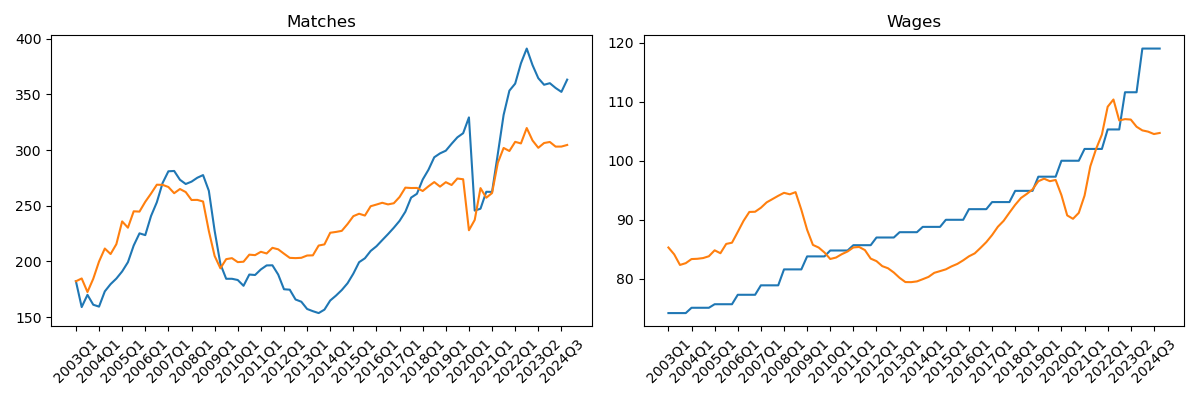
Figure 16: Observed and predicted number of matches and wage index
The purpose of this step is simply to check whether the model roughly reproduces the data.
8. Interactive immigration shock
In marimo we create the slider with mo.ui.slider as before.
immigration_slider = mo.ui.slider(
    start=0,
    stop=100,
    step=1,
    value=0,
    label="Immigration increase (%)"
)
The slider allows the user to simulate immigration increases between 0% and 100%.
9. Compute short‑run effects
We use the latest observation as the baseline and simulate additional immigrants entering unemployment. We evaluate this code for the default value of 0 immigration. We choose the latest year in our dataframe using .iloc[-1]; in Python the index [-1] refers to the last element.
immigration_slider
latest = df.iloc[-1]

U0 = latest["Unemployed labour force/Seasonally adjusted (x 1,000)"] * 1000
V0 = latest["Vacancies seasonally adjusted, unfilled (x 1000)"] * 1000

immigrants_per_year = 14000

additional = immigrants_per_year * immigration_slider.value / 100

U = U0 + additional
theta = V0 / U

w = beta * a_hat + (1 - beta) * b_hat * theta**(1 - alpha)

theta, w
1.074331550802139, 104.70413651538085
Short run assumption:
- immigration increases unemployment
- vacancies remain fixed
This reduces labor market tightness \(\theta = V/U\) and lowers wages.
10. Plot the wage curve
Finally we visualize how immigration moves the economy along the wage curve.
theta0 = V0 / U0

theta_grid = np.linspace(0.5*theta0, 1.5*theta0, 200)

w_grid = beta * a_hat + (1 - beta) * b_hat * theta_grid**(1 - alpha)

fig, ax = plt.subplots()

ax.plot(theta_grid, w_grid)
ax.scatter(theta, w)

ax.set_xlabel("Labor market tightness $\theta$")
ax.set_ylabel("Wage index")
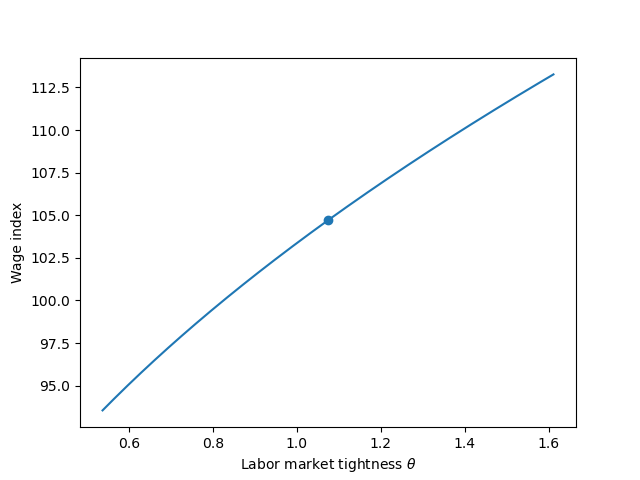
Figure 17: Wage curve: wage as a function of \(\theta\)
Interpretation:
- the curve shows wages implied by Nash bargaining
- immigration increases unemployment
- this lowers tightness \(\theta\)
- the economy moves left along the wage curve, reducing wages.
In the review questions we return to the long run outcome.
Summary
In this lecture we developed a simple search and matching model to study how workers and firms interact in the labor market. The model focuses on flows in the labor market: unemployed workers search for jobs while firms post vacancies, and matches occur through a matching function.
Using Dutch labor market data, we calibrated and estimated key parameters of the model and compared the model’s predictions to observed outcomes. We then used the model to simulate the effects of an immigration shock and analyze how unemployment, labor market tightness, and wages respond.
This illustrates how economists combine economic theory, data, and numerical simulation to analyze policy questions. Even relatively simple structural models can provide useful intuition about how labor market shocks propagate through the economy.
Search and matching models emphasize that unemployment and wages are determined by the interaction between workers and firms. Shocks such as immigration affect labor market outcomes by changing labor market tightness, which influences job‑finding probabilities and wages.
Python can be used to calibrate structural economic models by combining theory with data. Numerical simulation then allows economists to explore how policy shocks affect model outcomes.
Looking ahead: In the next lecture we move from discrete‑time simulations to continuous‑time models and learn how differential equations can describe economic dynamics.
Review Questions
Question 1. Simulating the matching function
Write a Python function that computes the number of matches \(M\) using the matching function
\(M = m U^\alpha V^{1-\alpha}\)
Choose parameter values \(m = 0.8\) and \(\alpha = 0.5\). Simulate how matches change when unemployment \(U\) increases from 50 to 200 while vacancies \(V = 100\) remain fixed. Plot matches as a function of unemployment. In the same figure also plot the number of matches for \(\alpha = 0.8\).
For which value of \(U\) do these lines intersect? Why is this the case?
Question 2. Job-finding probability
The probability that an unemployed worker finds a job is
\(p(\theta) = m \theta^{1-\alpha}\)
where \(\theta = V/U\).
Write Python code that computes and plots the job-finding probability for \(\theta\) values between 0.2 and 2; again, as above, choosing parameter values \(m = 0.8\) and \(\alpha = 0.5\).
Question 3. Wage curve
The wage equation in the lecture is
\(w = \beta a + (1-\beta)b\theta^{1-\alpha}\)
Assume \(a = 200\), \(b = 50\), \(\beta = 0.5\) and, as above, \(\alpha = 0.5\)
Write Python code that plots the wage curve for \(\theta\) between 0.2 and 2. Also, plot the wage curve for \(\alpha = 0.8\). For which value of \(\theta\) do the curves intersect?
Question 4. Immigration shock in the short run
Suppose the labor market initially has
U = 200 (thousand unemployed) V = 150 (thousand vacancies)
Immigration increases unemployment by 20%.
Write Python code that
- computes the initial tightness \(\theta_0\)
- computes the new tightness after immigration
- computes the corresponding wages using the wage equation
- computes long run equilibrium tightness and wage.
Hint
LLM Hint (how to prompt an LLM)
If you use an LLM to help with this question, explain the economic context and the equations clearly.
A starting prompt could be:
"I am solving an exercise from a graduate economics course on search and matching models. The wage equation is
\(w = \beta a + (1-\beta) b \theta^{1-\alpha}\)
and labor market tightness is \(\theta=V/U\).
Initially U = 200 and V = 150. Immigration increases unemployment by 20%.
Can you help me write Python code that
- computes the initial tightness,
- computes the new tightness after immigration,
- computes wages before and after the shock, and
- gives a short explanation at each step?"
Good prompting practice:
- Write the economic equations explicitly.
- Provide parameter values.
- Ask for both the Python code and a short explanation of the steps.
Always critically check the answer and ask follow-up questions. Never blindly copy/paste from an LLM’s response.
Question 5. Estimating the matching function
Using the matching function
\(M = m U^\alpha V^{1-\alpha}\)
generate simulated data for \(U\) and \(V\), compute \(M\), add some noise to \(M\) and then estimate the parameters \(m,\alpha\) using least squares.
Hint: you can use the function \(\ln(x)\) to make it look more like a linear regression if you find this useful for your intuition.
Lecture 5: Modeling Dynamics
Skills you learn in this lecture: continuous‑time economic modeling, solving differential equations numerically, analyzing transition paths in dynamic models.
Learning objectives
After completing this lecture you should be able to:
- understand how differential equations describe the evolution of economic variables
- compute transition paths in dynamic economic models
- analyze steady states and convergence in growth and learning models
Introduction
Much of economics is about understanding how things change over time. Capital accumulates gradually, firms learn from experience, and contracts must account for incentives that evolve across different types of consumers. These processes are inherently dynamic: what happens today influences what happens tomorrow.
To study such problems formally, economists often describe economic forces with differential equations. These equations capture how key variables evolve as a function of their current level and economic incentives. In many cases the models cannot easily be solved analytically, but modern numerical tools allow us to compute their behavior and visualize the implied dynamics.
The following three apps introduce three economic environments in which dynamics play a central role. Each example highlights a different type of dynamic reasoning commonly used in economic research.
Apps
Solow model
One of the most fundamental questions in macroeconomics is why some countries are richer than others and how economies grow over time. A key mechanism behind long‑run growth is capital accumulation: societies invest part of their income in machines, infrastructure, and technology that increase future production.
However, capital (per worker) does not grow automatically. Investment increases the capital stock, but depreciation and population growth work in the opposite direction. New workers require additional capital to maintain capital per worker and productivity, and existing capital gradually wears out.
The Solow growth model captures this tension between investment and dilution. In this framework, the economy produces output using capital and labor. A constant fraction of output is saved and invested, which increases the capital stock. At the same time, depreciation and population growth reduce the amount of capital available per worker.
These forces determine how capital per worker evolves over time. If the economy starts with very little capital, investment will exceed depreciation and capital will grow rapidly. If the economy becomes very capital‑intensive, depreciation and population growth eventually dominate, slowing further accumulation.
This dynamic adjustment leads to a steady state: a level of capital per worker at which investment exactly offsets depreciation and population growth. At this point the capital stock per worker stops changing.
An important question is how the steady state depends on economic parameters. For example, how would the long‑run level of capital change if households saved a larger fraction of their income? What happens if population growth increases? How does the productivity of capital affect the outcome? An interactive app where these parameters can be easily adjusted with sliders helps to answer these questions.
Thinking through these questions helps build intuition for the forces that determine long‑run economic development.
If the app does not load, open it in a new tab .
Mechanism design
Many markets involve asymmetric information. Firms often do not know exactly how much each consumer values their product. Some customers are willing to pay a lot, while others are much more price sensitive.
Consider a monopolist selling a product whose quality or quantity can vary. Consumers differ in how much they value this quality, but the firm cannot observe their valuation directly. If the firm could perfectly observe each consumer’s type, it could tailor a price to each individual and extract all surplus. In reality, the firm must design a pricing strategy that induces consumers to reveal their preferences voluntarily.
This leads to the problem of mechanism design or screening. The firm offers a menu of contracts, where each contract specifies a quantity or quality level together with a price. Consumers choose the option that maximizes their own utility.
The difficulty is that high‑valuation consumers might pretend to be low‑valuation consumers if the low‑quality contract is cheaper. To prevent this, the menu must be designed so that each consumer prefers the option intended for their own type. This requirement is called incentive compatibility or truthful revelation.
Ensuring truthful behavior typically forces the firm to leave some surplus –often called information rents– to higher-valuation consumers. These rents are the price the firm must pay to obtain information about consumers’ willingness to pay.
The resulting optimal contracts display several interesting patterns. Higher types typically receive higher quality and pay higher prices. At the same time, the allocation is generally distorted relative to the socially efficient outcome, especially for low‑valuation consumers.
Understanding these distortions is central to many areas of economics, including regulation, taxation, insurance, and pricing strategies in digital markets.
For our analysis in this lecture we need two mathematical results that you may not have seen before: the envelope theorem and the Euler equation for dynamic optimization.
Click here if you need a refresher on the envelope theorem
The envelope theorem is a property of optimization problems that economists tend to use a lot. The following clip explains what it is and illustrates the envelope theorem with a simple example.
Click here if you need a refresher on the Euler equation
The Euler equation is used in dynamic optimization problems.
We will use the Euler equation in two applications below. In these applications, we optimize over two variables and for one of these variables the objective function does not depend on the time derivative of this variable. Hence, we have a problem like:
\[ \max_{x,y} \int_{t_0}^{t_1} f(t,x(t),y(t),x'(t))dt \]
Then the Euler equation implies that the first order conditions are:
\[ \frac{\partial f}{\partial x} - \frac{d}{dt} \left( \frac{\partial f}{\partial x'} \right) = 0 \]
and for \(y(t)\):
\[ \frac{\partial f}{\partial y} = 0 \]
because \(\frac{\partial f}{\partial y'} = 0\).
If the app does not load, open it in a new tab .
Learning by doing
Firms often become more efficient as they gain experience with a production process. This phenomenon, known as learning by doing, has been documented in many industries such as semiconductor manufacturing, aircraft production, and renewable energy technologies.
When firms produce more today, they accumulate knowledge that reduces future production costs. This creates a dynamic trade-off. Producing more in the present may reduce current profits, but it can increase future profitability by lowering costs.
Because of this trade-off, firms may choose production paths that differ from the static profit-maximizing quantity. A purely static monopolist would simply choose the output level that maximizes current profits given current costs. A forward‑looking firm, however, takes into account that higher production today accelerates learning and reduces costs tomorrow.
This introduces an investment motive in production decisions. Output today not only generates current revenue but also contributes to the firm’s stock of experience.
Several interesting questions arise in this environment. Should firms produce more output early or late in the life of a product (early because they want to invest in learning or late as their costs fall with accumulated production)? How does the importance of the future –captured by the discount rate– affect production choices? And how does the value of accumulated experience change over time?
Analyzing these questions helps illustrate how dynamic optimization differs from static decision making. When future benefits are important, firms may deliberately deviate from short‑run profit maximization in order to improve long‑run outcomes.
If the app does not load, open it in a new tab .
Python Code Explanation
Interactivity in Marimo
Recall that in marimo, interactive elements are created with mo.ui widgets.
Example:
import marimo as mo

alpha = mo.ui.slider(0.1, 0.9, value=0.3, step=0.01, label="Capital share ($\alpha$)")
s = mo.ui.slider(0.01, 0.6, value=0.2, step=0.01, label="Savings rate")
Then display them:
alpha, s
To use the value inside calculations:
alpha.value
s.value
Marimo automatically re-runs dependent cells when a widget value changes.
So if a plot depends on alpha.value, it updates automatically when the alpha slider moves.
Solving Differential Equations in SciPy
Two numerical solvers are used in the apps.
Initial Value Problems (IVP)
Used in App 1.
An IVP has the structure
y'(t) = f(t, y)
y(t0) = y0
Meaning:
- we know the starting value
- we simulate the path forward in time.
SciPy function:
scipy.integrate.solve_ivp
Basic syntax:
solve_ivp(function, t_span, y0, t_eval=grid)
Arguments:
function: defines the differential equationt_span: time interval(t0, T)y0: initial valuet_eval: grid of times where the solution is reported
The solver internally uses numerical integration methods (typically an algorithm called Runge–Kutta).
The result object contains:
sol.t     time grid
sol.y     solution values
Boundary Value Problems (BVP)
Used in App 2 and App 3.
A BVP specifies conditions at different points \(a\) and \(b\), e.g.
y(a) = value1
y(b) = value2
Instead of simulating forward from a known starting value, the algorithm must search for a function that satisfies both boundaries simultaneously.
SciPy function:
scipy.integrate.solve_bvp
Basic structure:
solve_bvp(system, boundary_conditions, x_grid, initial_guess)
Inputs:
system(x,y)→ differential equationsboundary_conditions(ya,yb)→ conditions at start and endx_grid→ grid for solutioninitial_guess→ guess for the solution path
The solver iteratively adjusts the path until the differential equations and boundary conditions hold.
The result object includes
sol.x     grid
sol.y     solution
sol.yp    derivatives
Solow Growth Model
Model equation
Capital evolves according to \(k'(t) = s k^{\alpha} - (n+\delta) k\)
This is a single differential equation. And we have a given capital stock \(k(0)=k_0\) at the start of time: initial value problem.
Step 1: Import libraries
import marimo as mo
import numpy as np
import matplotlib.pyplot as plt
from scipy.integrate import solve_ivp
Step 2: Define parameters (interactive)
In marimo:
alpha = mo.ui.slider(0.1,0.9,value=0.3,step=0.1)
s = mo.ui.slider(0.01,0.6,value=0.2)
n = mo.ui.slider(0.0,0.05,value=0.01)
delta = mo.ui.slider(0.0,0.1,value=0.05)
k0 = mo.ui.slider(0.01,5.0,value=0.5)
Adjust the definitions of the sliders; e.g. specifying step for each parameter or changing the default value.
Step 3: Define the differential equation
def solow(t,k):
    return s.value*k**alpha.value - (n.value+delta.value)*k
Important detail: SciPy expects the function signature
f(t,y)
even if the equation does not depend on t, like the function solow actually does not depend on t.
Step 4: Compute steady state
The steady state solves \(0 = s k^{\alpha}-(n+\delta)k\)
which gives
k_ss = (s.value/(n.value+delta.value))**(1/(1-alpha.value))
Step 5: Time grid
t_span = (0,50)
t_eval = np.linspace(0,50,200)
This means we simulate the model from time 0 to 50 and evaluate at 200 points.
Step 6: Solve the IVP
sol = solve_ivp(solow, t_span, [k0.value], t_eval=t_eval)
Note: [k0] must be a list because SciPy allows systems of equations.
Access the solution by:
sol.t
sol.y[0]
Step 7: Plot transition dynamics
plt.plot(sol.t, sol.y[0])
plt.axhline(k_ss)
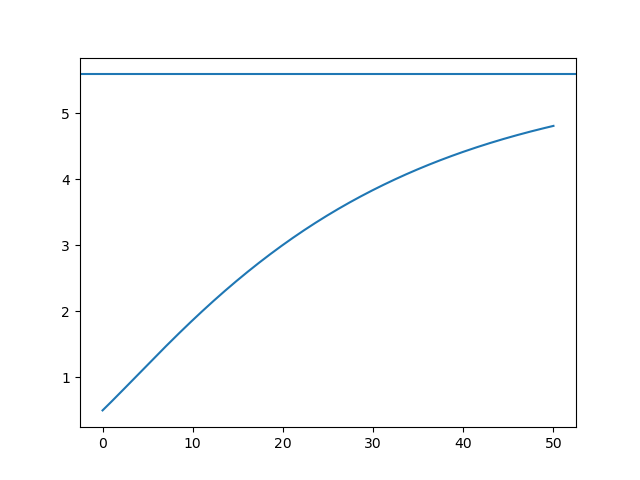
Figure 18: Capital levels converge to the steady state level over time
We leave it to you to add labels on the axes, a title, legend etc.
Step 8: Solow diagram
Create a grid of capital levels:
k_grid = np.linspace(0.01,5,200)
Compute
investment = s.value*k_grid**alpha.value
break_even = (n.value+delta.value)*k_grid
Plot both curves.
Their intersection is the steady state.
Mechanism Design Model
This problem involves two differential equations:
\[u'(\theta) = (\theta - \lambda/f(\theta))/c\]
and
\[\lambda'(\theta) = -f(\theta)\]
Boundary conditions: \(u(\theta_{min}) = 0, \lambda(\theta_{max}) = 0\)
So this is a boundary value problem.
Step 1: Define density
from scipy.integrate import solve_bvp

def f(t):
    return 1/(theta_max-theta_min)*np.ones_like(t)
This corresponds to a uniform distribution.
np.ones_like(t) ensures the function works for vector inputs needed in the scipy functions below.
Step 2: Define system of ODEs
def design(t,y):
    return np.vstack([
        (t - y[1]/f(t))/c,
        -f(t)
    ])
Interpretation:
y is a vector: \(y[0] = u(\theta), y[1] = \lambda(\theta)\)
np.vstack stacks derivatives into a matrix required by solve_bvp.
Step 3: Boundary conditions
def bc(ya,yb):
    return np.array([ya[0], yb[1]])
where
ya = solution at theta_min
yb = solution at theta_max
So the function enforces
u(theta_min)=0 # because index [0] in ya refers to u(theta): y[0]
lambda(theta_max)=0 # because index [1] in yb refers to lambda(theta): y[1]
Step 4: Initial grid
theta_min = 1
theta_max = 2
t_eval = np.linspace(theta_min,theta_max,100)
Step 5: Initial guess
guess = np.zeros((2, t_eval.shape[0]))
- 2 variables \(u\) and \(\lambda\)
- guess values along the grid for each equation
Step 6: Solve BVP
sol = solve_bvp(design, bc, t_eval, guess)
After solving:
sol.y[0] = u(theta)
sol.y[1] = lambda(theta)
Step 7: Recover quantities and prices
The optimal quantity:
x = sol.yp[0]
Because \(u'(\theta) = x(\theta)\) and yp[0] refers to the derivative (“y prime”) of the first element in y which is \(u\).
Price is derived from \(p = \theta x - u\), so
p = t_eval*x - sol.y[0]
And then we can plot the solution for output/quality \(x\) and the price \(p\) as a function of consumer type \(\theta\).
plt.plot(t_eval,x,label='$x$')
plt.plot(t_eval,p,label='$p$')
plt.legend()
plt.xlabel('$\\theta$')
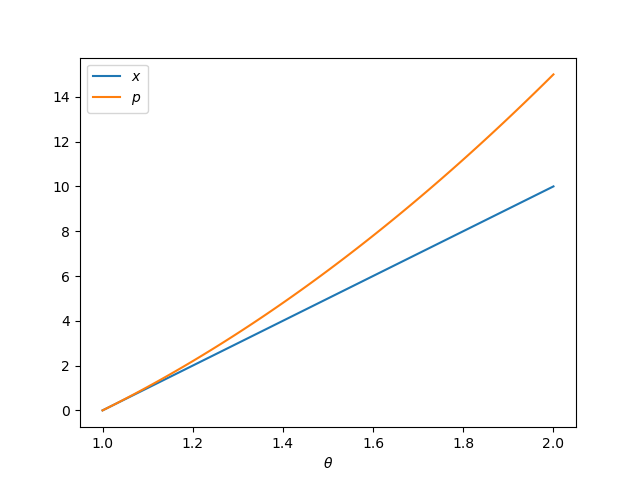
Figure 19: Output/quality and price as a function of consumer type \(\theta\)
Dynamic Pricing with Learning
This model also forms a BVP, but with time as the state variable.
State variables: \(Q(t)\), cumulative production, \(\lambda(t)\), shadow value
Differential equations:
- \(Q'(t) = q(t)\)
- \(\lambda'(t) = e^{-\rho t} q(t) c'(Q(t))\)
Boundary conditions: \(Q(0) = 0, \lambda(T) = 0\)
Here we only give you the steps for you to reproduce the solutions and figures in the app above.
Step 1: Define system
def learning(t,y):
    return #complete the code
State variables stored as \(y[0] = Q, y[1] = \lambda\), then return derivatives \(Q'(t), \lambda'(t)\).
scipy expects the result stacked:
np.vstack((dQdt, dlambdadt))
Step 2: Boundary conditions
def bc(ya,yb):
    return np.array([ya[0], yb[1]])
Meaning \(Q(0) = 0, \lambda(T) = 0\)
Step 3: Solve BVP
sol = solve_bvp(learning, bc, t_eval, guess)
Extract solution: \(Q = sol.y[0]\), \(\lambda = sol.y[1]\), \(q = sol.yp[0]\) since \(Q'(t) = q(t)\)
Step 4: Static benchmark
The static monopoly solution is
q_static = (1 - c/(1+Q)) / 2
Plot both: dynamic and static \(q(t)\) in one figure.
Summary
In this lecture we studied how dynamic economic models can be analyzed using numerical tools in Python. We explored examples in which economic decisions and outcomes evolve over time or type, capital accumulation, mechanism design with asymmetric information, and learning-by-doing dynamics.
These examples illustrate how differential equations and dynamic optimization problems can be translated into numerical algorithms. By solving these models computationally we can visualize adjustment paths, understand steady states, and explore how economic outcomes respond to parameter changes.
Dynamic economic models describe how decisions and incentives today affect outcomes in the future. Numerical methods allow economists to analyze these dynamics even when analytical solutions are difficult or impossible to obtain.
Dynamic economic models expressed as differential equations can be solved numerically in Python using tools such as
scipy.integrate. This allows economists to compute transition paths and visualize how economies evolve over time.
Looking ahead: In the next lecture we extend the analysis of dynamic models to systems with multiple interacting variables and learn how phase diagrams help analyze stability.
Review Questions
Question 1: Solow model
Create the Solow model from above in a marimo notebook and analyze the following:
- add technological growth
- plot output \(f(k)\) over time. How is this figure affected by the initial capital stock \(k_0\) and the saving rate \(s\)? Create sliders for \(k_0\) and \(s\) to analyze this.
Question 2: Mechanism design
Create the mechanism design model in your marimo notebook:
- change the distribution \(f(\theta)\); e.g. create a dropdowm menu for the user to choose from uniform, exponential and (perhaps) another distribution
- compare the information rent in the optimal solution with the information rent in the first-best allocation.
Question 3: Learning-by-doing
Create the learning-by-doing model in your marimo notebook:
- vary time horizon
Tusing a slider - introduce capacity constraints
- in competition policy cases there is a suspicion that firms pricing below marginal costs (\(p < c\)) are trying to remove their competitors from the market to enjoy monopoly profits in the future. Discuss this suspicion in the light of this model.
Hint
LLM Hint (how to prompt an LLM)
If you ask an LLM for help with this question, clearly describe both the economic model and the dynamic optimization problem.
Example prompt you could use:
“I am working on a graduate economics exercise about a dynamic learning‑by‑doing model solved with differential equations in Python. The model describes how experience or cumulative output affects productivity over time. I need to simulate how the optimal output path changes when the time horizon T or capacity constraints change. Can you help me write Python code using scipy (solve_ivp or a similar solver) to simulate the dynamic path and explain the economic interpretation of the results?”
Helpful prompting strategies:
- Explain the economic setting (learning‑by‑doing and dynamic optimization).
- Write down the equations or objective function if they are available.
- Specify the Python tools you are using (for example scipy or solve_ivp).
- Ask the LLM to explain both the code and the economic intuition.
Read and analyze the LLM’s reponse critically. Never trust it on first sight; do not blindly copy/paste an LLM’s response.
Lecture 6: Dynamical Systems
Skills you learn in this lecture: analyzing two‑dimensional dynamical systems, phase diagrams, and stability of economic equilibria.
In this lecture we program two dynamic models that are used in Economics: the Ramsey model of consumption and investment and the predator-prey model to analyze business cycles.
Learning objectives
This lecture introduces dynamic models that describe how economic variables evolve over time.
In this lecture you will learn:
- how to interpret trajectories and phase diagrams in two‑dimensional systems
- how the Ramsey model describes optimal consumption and capital accumulation over time
- how the Lotka–Volterra predator–prey model generates cyclical dynamics
- how the same mathematical structure can be used to study economic business cycles (Goodwin model)
By the end of the lecture you will have implemented both models in Python and explored their dynamics interactively.
Introduction
In this lecture we extend our knowledge (from the previous lecture) on differential equations in economics.
The Ramsey model analyses savings and investment like the Solow model, but –unlike the Solow model– the saving decision is endogenized. A consumer maximizing utility decides how much she wants to save each period.
We also consider an example of a system of differential equations: the predator-prey model. In the exercises you will see how second order differential equations (i.e. equations with a second derivative in them, like \(y''(t)\)) can be solved in the same way as a system of equations.
apps
Ramsey model
The Ramsey model studies how an economy chooses consumption and saving over time when households are forward‑looking. Unlike the Solow model, the saving rate is not imposed from outside the model. Instead, a representative household decides how much to consume and how much to save in order to maximize lifetime utility.
The household solves
\[ \max \int_0^\infty e^{-\rho t} u(c(t)) dt \]
subject to the capital accumulation equation
\[ \dot{k}=f(k)-\delta k-c \]
Capital increases when output exceeds consumption and depreciation. The parameter \( \rho \) measures how impatient households are (the discount rate), while \( \delta \) is the depreciation rate.
Optimal behaviour implies a second dynamic equation describing how consumption evolves over time. Together with capital accumulation this gives a two‑dimensional dynamical system
\[ \dot{k} = f(k)-\delta k-c \] and in the app we assume \(u(c)=c^{0.7},f(k)=k^{0.5}\) which gives the Euler equation: \[ \dot{c} = \frac{c}{0.3}\left(0.5 k^{-0.5}-\delta-\rho\right) \]
The economy therefore evolves jointly in capital \(k\) and consumption \(c\). The steady state \((k^*,c^*)\) occurs where both variables stop changing.
A key insight of the Ramsey model is that the steady state is saddle‑path stable. This means that only one particular initial level of consumption is consistent with convergence to the steady state for a given initial capital stock. If consumption is too high, the economy depletes capital. If consumption is too low, capital grows excessively.
The app below allows you to explore these dynamics interactively.
You can change:
- the discount rate \( \rho \)
- the depreciation rate \( \delta \)
- the initial capital stock \(k_0\)
- the initial consumption level \(c_0\)
The figures show two important objects:
- Time paths of capital and consumption.
- The phase diagram in \((k,c)\) space.
The phase diagram shows combinations \((k,c)\) where \( \dot{k}=0 \) and \( \dot{c}=0 \), as well as trajectories implied by initial conditions. The app also computes the saddle path, which is the unique trajectory that leads to the steady state.
Use the sliders to explore how parameters affect the steady state and how the economy adjusts when it starts away from equilibrium.
If the app does not load, open it in a new tab .
Predator-prey model
The predator–prey model is one of the simplest and probably most famous examples of a dynamic system with interacting variables. It was originally developed by Alfred Lotka and Vito Volterra in the 1920s to describe how two biological populations evolve over time.
The key idea is that the growth of each population depends on the other.
- Prey (for example rabbits) reproduce naturally and would grow exponentially if predators did not exist.
- Predators (for example foxes) depend on prey for food, so their population grows when prey are abundant.
- When predators become numerous, they reduce the prey population.
- As prey become scarce, predators begin to starve and their population declines.
This interaction creates a feedback loop that typically produces cycles: prey rise first, predators follow, prey then decline, and predators eventually decline as well. The Ramsey model above is also a two-dimensional system, but it does not generate cycles.
The classic Lotka–Volterra system is
\[ \dot{x} = ax - bxy \]
\[ \dot{y} = -cy + dxy \]
where
- \(x(t)\) is the prey population
- \(y(t)\) is the predator population
and the parameters have the following interpretation:
- \(a\): natural growth rate of prey
- \(b\): intensity of predation
- \(c\): natural death rate of predators
- \(d\): efficiency with which predators convert prey into new predators
Although this model originated in ecology, the same mathematical structure appears in many areas of economics. One important example is the Goodwin growth cycle model, where the interacting variables are
- the employment rate
- the wage share of income
When employment is high, workers have stronger bargaining power and wages rise. Higher wages reduce profits and slow hiring, causing employment to fall. When unemployment rises, wage pressure weakens and profits recover, leading to renewed hiring. This interaction generates endogenous business cycles.
The app below allows you to experiment with these dynamics. You can interpret the variables either as predator–prey populations or as employment and wage share in the Goodwin model. By adjusting the parameters and initial values, you can see how cycles emerge and how their size and speed depend on the underlying economic mechanisms.
The phase diagram shows the trajectory of the system in the \((x,y)\) plane and illustrates how the interaction between the two variables produces cyclical motion.
If the app does not load, open it in a new tab .
Python Code Explanation
Ramsey model in Python
Below we reproduce the main elements of the app using standard Python code that can be run inside a marimo notebook.
Importing libraries
import marimo as mo
import numpy as np
import matplotlib.pyplot as plt
from scipy.integrate import solve_ivp
Choosing parameters with sliders
rho = mo.ui.slider(0.01, 0.06, value=0.03, step=0.005, label="Discount rate $\rho$")
delta = mo.ui.slider(0.02, 0.08, value=0.05, step=0.005, label="Depreciation $\delta$")

rho, delta
These sliders allow the user to change parameter values interactively.
- \( \rho \) represents how impatient households are.
- \( \delta \) represents the depreciation rate of capital.
Initial conditions
k0 = mo.ui.slider(5.0, 50.0, value=20.0, label="Initial capital k0")
c0 = mo.ui.slider(0.5, 4.0, value=2.0, label="Initial consumption c0")

k0, c0
A dynamical system requires initial conditions. These determine where the economy starts in the \((k,c)\) phase space.
Different initial values will produce different trajectories.
Computing the steady state
From the Euler equation, the steady state satisfies
\[ f'(k^*) = \rho + \delta \]
With \(f(k)=k^{0.5}\), we have \(f'(k)=0.5k^{-0.5}\). Solving this gives
\[ k^{*} = \left(\frac{0.5}{\rho+\delta}\right)^2 \]
Then \(\dot{k} = 0\) implies \(c^* = \sqrt{k^{*}}-\delta k^*\):
k_star = (0.5/(delta + rho))**2
c_star = np.sqrt(k_star) - delta*k_star
Defining the dynamical system
We now translate the economic model into a Python function.
def ramsey_rhs(t, y):
    k, c = y

    dk = np.sqrt(k) - delta*k - c
    dc = (c/0.3) * (0.5/np.sqrt(k) - delta - rho)

    return [dk, dc]
This function defines the right‑hand side of the differential equations.
Input:
tis time.ycontains the variables \(k\) and \(c\).
Output:
dkcorresponds to \( \dot{k} \)dccorresponds to \( \dot{c} \)
The function therefore encodes the Ramsey model’s dynamics.
Simulating the dynamics
We can now solve the system numerically.
sol = solve_ivp(
    ramsey_rhs,
    (0, 80),
    [k0, c0],
    t_eval=np.linspace(0, 80, 400)
)

k = sol.y[0]
c = sol.y[1]
t = sol.t
solve_ivp numerically integrates the differential equations: this is an initial value problem.
Inputs:
(0,80)is the time interval.[k0,c0]are the initial values.t_evalspecifies the grid of time points where the solution is stored.
The output sol contains the full simulated path of the economy.
Plotting the time paths
fig, ax = plt.subplots()

ax.plot(t, k, label="capital k(t)")
ax.plot(t, c, label="consumption c(t)")

ax.axhline(k_star, linestyle="--", label="k*")
ax.axhline(c_star, linestyle="--", label="c*")

ax.set_xlabel("time")
ax.legend()
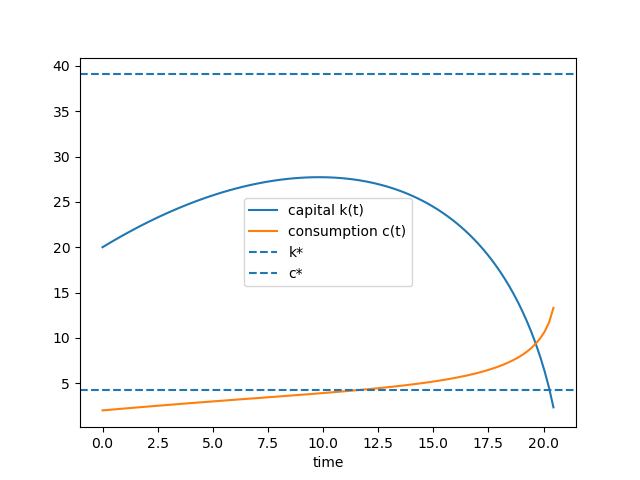
Figure 20: Solution of the Ramsey model for \(\rho=0.03,\delta=0.05,k_0=20,c_0=2\)
This figure shows how capital and consumption evolve over time.
The dashed lines indicate the steady state. If the system converges, both variables approach these values.
Plotting the phase diagram
The phase diagram helps visualize the joint dynamics of \(k\) and \(c\).
kgrid = np.linspace(0.1, 100, 120)
cgrid = np.linspace(0.1, max(c), 80)

K, C = np.meshgrid(kgrid, cgrid)

dK = K**0.5 - delta*K - C
dC = (C/0.3) * (0.5*K**-0.5 - delta - rho)

fig, ax = plt.subplots()

ax.streamplot(K, C, dK, dC, color="gray")

c_kdot0 = kgrid**0.5 - delta*kgrid
ax.plot(kgrid, c_kdot0, label="k'=0")

ax.axvline(k_star, linestyle="--", label="c'=0")

ax.plot(k, c, color="red", label="trajectory")
ax.scatter([k_star], [c_star])

ax.set_xlabel("capital k")
ax.set_ylabel("consumption c")
ax.legend()
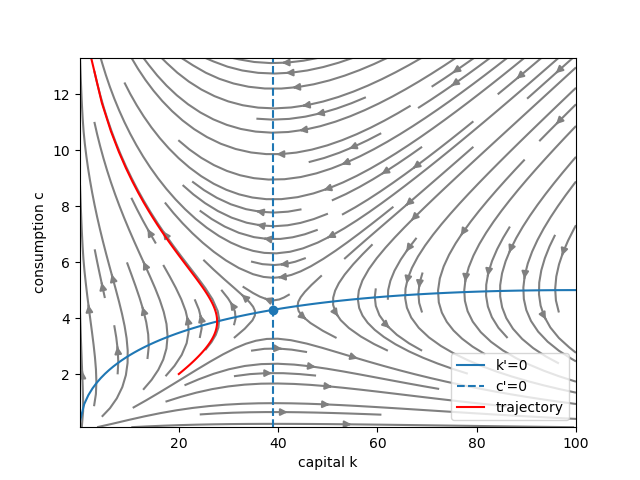
Figure 21: Phase diagram of the Ramsey model
This diagram shows the dynamics in state space. Use google or an LLM to find details on numpy’s meshgrid and matplotlib’s streamplot.
Key elements:
- The streamplot shows the direction of motion of the system.
- The curve \(k'=0\) shows combinations of \(k\) and \(c\) where capital is constant.
- The vertical line \(c'=0\) shows where consumption growth is zero.
- The red line is the trajectory implied by the chosen initial conditions.
This graphical approach is widely used in macroeconomics to understand the behavior of dynamic models.
Running these cells in a marimo notebook allows you to experiment with parameter values and observe how the Ramsey model behaves numerically and graphically.
predator–prey model
We now reproduce the core elements of the simulation using Python code that can be run in a marimo notebook.
Importing the required libraries
import marimo as mo
import numpy as np
import matplotlib.pyplot as plt
from scipy.integrate import solve_ivp
Choosing parameter values
a = mo.ui.slider(0.1, 3.0, value=1.0, label="a: prey growth rate")
b = mo.ui.slider(0.1, 2.0, value=0.5, label="b: predation intensity")
c = mo.ui.slider(0.1, 3.0, value=1.5, label="c: predator death rate")
d = mo.ui.slider(0.1, 2.0, value=0.75, label="d: predator reproduction efficiency")
These sliders allow us to change the parameters interactively.
Economically (in the Goodwin interpretation):
areflects the baseline growth of employment when wage pressure is low.bmeasures how strongly a higher wage share reduces employment growth.ccaptures downward pressure on wages when labour markets are weak.dmeasures how strongly high employment pushes wages upward.
Changing these parameters alters the speed and size of the cycles.
Setting initial values
x0 = mo.ui.slider(0.5, 10.0, value=4.0, label="initial x")
y0 = mo.ui.slider(0.5, 10.0, value=2.0, label="initial y")

x0, y0
Dynamic systems require initial conditions. These determine where the system starts in the phase space.
- \(x_0\) might represent the initial prey population (or employment rate).
- \(y_0\) might represent the initial predator population (or wage share).
Different initial values can lead to different trajectories, even with the same parameters.
Writing the differential equations
def lotka_volterra(t, z):
    x, y = z

    dx = a*x - b*x*y
    dy = -c*y + d*x*y

    return [dx, dy]
This function encodes the Lotka–Volterra system.
Inputs:
tis time (required by the solver even though the equations do not depend explicitly on time).zis a vector containing the variables \(x\) and \(y\).
Outputs:
dxcorresponds to \( \dot{x} \), the growth rate of the first variable.dycorresponds to \( \dot{y} \), the growth rate of the second variable.
The function therefore translates the mathematical model directly into Python.
Solving the system numerically
T = 40

sol = solve_ivp(
    lotka_volterra,
    (0, T),
    [x0, y0],
    t_eval=np.linspace(0, T, 500)
)

t = sol.t
x = sol.y[0]
y = sol.y[1]
solve_ivp numerically integrates the system of differential equations.
Key elements:
(0, T)defines the time interval.[x0, y0]provides the initial conditions.t_evalspecifies the time grid where the solution should be recorded.
The result sol contains the simulated paths of both variables.
Plotting the time paths
fig, ax = plt.subplots()

ax.plot(t, x, label="x(t)")
ax.plot(t, y, label="y(t)")

ax.set_xlabel("time")
ax.legend()
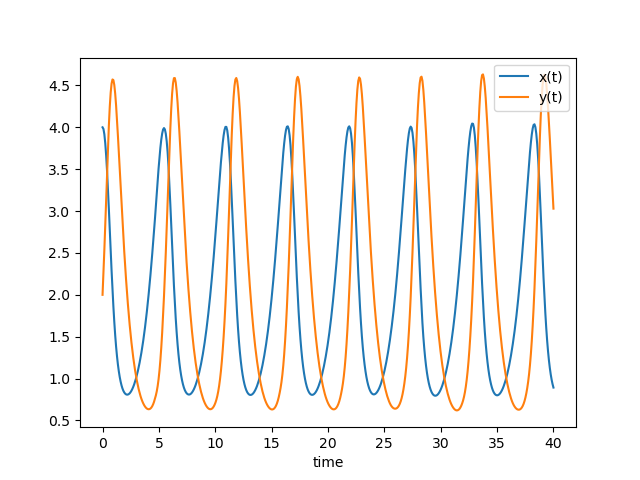
Figure 22: Solution to predator-prey model with \(a=1.0,b=0.5,c=1.5,d=0.75\) and \(x_0 = 4.0, y_0 = 2.0\).
This figure shows how the two variables evolve over time.
In predator–prey terms, you typically observe that:
- the prey population rises first,
- the predator population rises with a delay,
- the prey population then falls,
- and predators eventually decline as well.
This delayed interaction generates cyclical dynamics.
Plotting the phase diagram
fig, ax = plt.subplots()

ax.plot(x, y)

ax.set_xlabel("x")
ax.set_ylabel("y")
ax.set_title("Phase diagram")

fig
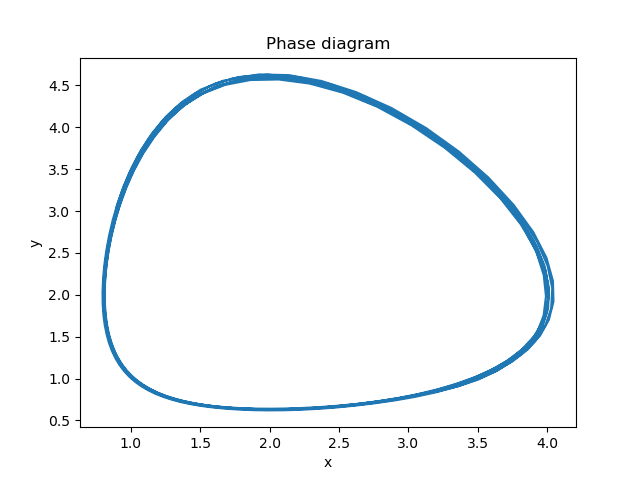
Figure 23: Phase diagram of the predator-prey model
The phase diagram plots one variable against the other rather than against time.
This representation highlights the structure of the dynamic system. For the Lotka–Volterra model, the trajectory typically forms a closed orbit, meaning the system cycles indefinitely.
Summary
In this lecture you explored how dynamic systems can be used to study economic behavior over time.
You have learned:
- how to translate an economic model into a system of differential equations
- how to simulate these equations numerically using Python
- how to interpret time paths showing how variables evolve over time
- how to use phase diagrams to visualize the interaction between state variables
- how the Ramsey model determines optimal consumption and capital accumulation and leads to a saddle‑path equilibrium
- how predator–prey dynamics generate cyclical behavior through feedback between variables
- how the same mathematical structure can be applied to macroeconomic fluctuations in the Goodwin business cycle model
Many economic models involve multiple variables that interact dynamically. Phase diagrams and numerical simulations help economists understand how these interactions determine stability, adjustment paths, and long‑run equilibria.
Two‑dimensional dynamical systems can be simulated in Python and visualized using time paths and phase diagrams. These computational tools help economists study stability, saddle paths, and cyclical dynamics.
Review Questions
Test your understanding of the dynamic systems introduced in this lecture. For each question:
- Explain the economic intuition behind the model.
- Use Python to simulate the model and interpret the results.
Question 1 Ramsey dynamics and adjustment paths
Use the Ramsey model app and vary the initial capital stock \(k_0\).
- a. Find a value of \(k_0\) for which the economy initially reduces consumption before converging to the steady state.
- b. Find a value of \(k_0\) for which the economy initially increases consumption.
Question 2 Predator–prey model: steady state and cycles
Consider the Lotka–Volterra system
\(\dot{x}=ax-bxy\)
\(\dot{y}=-cy+dxy\).
- a. Compute the steady state \((x^*,y^*)\) of the system.
- b. Plot this steady state in the phase diagram of the app.
- c. Explain why the trajectories of the system typically form closed cycles around this point.
Question 3 From predator–prey to a second‑order differential equation
Warning This question is rather difficult and we expect you to need an LLM to solve it! This exercise is more about practicing using LLMs than it is about math. We do not assume that you to know the math behind the question; although you may/will understand it once you solved the exercise.
Consider the following second order differential equation:
\[ u''=(c-de^u)(a-u') \]
with \(a=c=d=1\) and initial conditions \(u(0) = u'(0) = 0.5\).
First hint: we kept the parameter names \(a,c,d\) in the differential equation to give you a clue.
We want you solve this differential equation with solve_ivp (which can not solve second order differential equations) and use one of the apps in this lecture to verify your solution.
Second hint: define a new variable \(v = u'\).
Course takeaway: Python as a tool for economic reasoning
Throughout these lectures you have seen how Python can be used as a practical tool for economic analysis. Even relatively simple pieces of code allow economists to simulate models, visualize economic mechanisms, and explore how outcomes change when parameters vary.
Across the six lectures we used Python in several complementary ways:
- to simulate economic processes, such as job flows or capital accumulation
- to analyze empirical data, estimate relations between variables
- to compute equilibria in economic models
- to solve differential equations describing dynamic economic systems
- to communicate intuition through interactive apps
Modern economic research and policy analysis increasingly rely on computational tools. Being able to translate economic ideas into code allows economists to explore models more deeply and to communicate their insights more clearly.
Bibliography
Footnotes:
Alternatively, you can access the data directly by defining csv_url = ("https://raw.githubusercontent.com/janboone/" "Python-programming-for-economists/master/data/gdp_healthcare_nl.csv") and writing df = pd.read_csv(csv_url)